The CSU Labor Cost Distribution process primary goal is to transmit a CSU payroll expenditure journal from the SCO Pay Tape to the CFS Data Warehouse System. This process does so use reporting elements established by position management and the Payroll PIMS system.
This checklist will discuss the elements from several modules that impact the LCD process as well as how to run the LCD process.
LCD Process
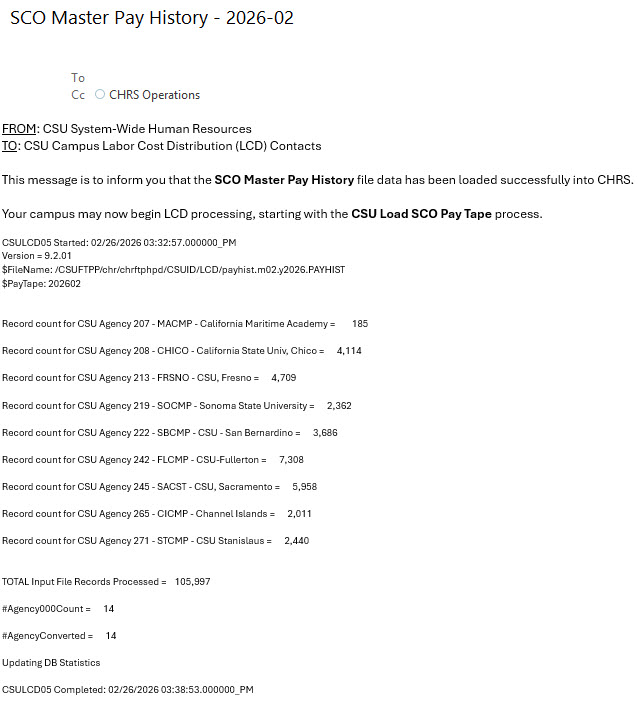
Each month, an email will be sent to the campus LCD Contacts notifying them that the Paytape has been loaded into CHRS and that processing may begin. Upon receipt of this email, LCD processing may officially start.
Real-time audit query to capture employees with a blank Pay Group (PAYGROUP) that need to be fixed before proceeding with LCD processing.
Real-time audit query to capture employees with a blank Employee Classification (EMPL_CLASS) that need to be fixed before proceeding with LCD processing.
Real-time audit query to capture student employees who have had a student task profile.
Combo Code Sync synchronizes ChartField values from CFS to CHRS, ensuring alignment and preventing invalid combo codes or misaligned journals. Campuses should maintain ChartFields in CFS—not CHRS—to keep VALID_COMBO_TBL and ACCT_CD_TBL aligned and avoid duplicates, which can prevent Time Admin from running successfully.
Job Aid: Run Combo Code Sync
This is the first campus task of the LCD process.
Job Aid: Campus Load SCO Pay Tape
The CSU Pre-Check Audit Report identifies potential errors from missing or incorrect data. Some errors are fatal and may stop processing; others are minor.
Job Aid: CSU Pre-Check Audit Report
The report maps SCO paytape payroll balances (earnings, deductions, and taxes) to CSU Labor Cost Distribution using Agency Codes, ensuring deductions and employer contributions are charged to the correct ChartFields and GL accounts.
Job Aid: CSU Paytape Balance by Agency
The report identifies all charges from the pay tape and allows users to group them for balancing. It can be run after the CSU Load SCO Data process completes successfully.
Job Aid: CSU Pay Tape Detail Balance
The process assigns default Combination Codes (based on LCD setup) for all positive pay entries from Time and Labor where the Payable Status in TL_PAYABLE_TIME = 'TR'. This step must be run prior to creating CSU Paycheck Data.
Job Aid: CSU TL Earnings Distribution
The CSU Create Paycheck Data step’s purpose is to build/populate the CHRS paycheck tables from the loaded SCO paytape data so the pay period is ready for YTD updates and Labor Cost Distribution.
Job Aid: CSU Create Paycheck Data Job
The CSU Check Errors Correction process captures errors identified by the CSU Create Paycheck process in the CSU_CHECK_ERROR table and requires those errors to be resolved.
Job Aid: CSU Check Errors Correction
Real-time audit query to help campuses confirm the GL Interface/Export Accounting Lines total for comparison between CHRS and CFS.
This procedure starts the final CSU Create Paychecks process and the CSU Update YTD Balances process.
Job Aid: CSU Paycheck Data Finalize Job
This process takes the finalized paycheck data for a Paytape Period/Business Unit and creates the distribution rows that will later be validated and turned into GL accounting line.
Job Aid: CSU Distribute Paychecks
The CSU Distribution Errors captures errors identified by the CSU Distribute Paychecks process and requires those errors to be resolved.
Job Aid: CSU Distribution Errors
This is the last chance step (before the final journal is created) to manually change or split an employee’s LCD distribution lines.
- You can override the default funding and/or split a line across multiple Combo Codes, but the total Distributed Amount must equal the original amount or the page won’t save.
- FTE is prorated based on the split amounts to the new Combo Codes.
- You can override Earnings, Deductions, and Taxes; the overrides write directly to PS_CSU_PAY_ERN_DST, PS_CSU_PAY_DED_DST, and PS_CSU_PAY_TAX_DST.
Job Aid: Distribution Override
This process creates the accounting lines to be published to CFS and requires an active database link to CFS.
Job Aid: CSU General Ledger (GL) Interface
The purpose of the reports is to provide paycheck distribution breakdown by Chart Field as specified on the run control.
Job Aid: CSU Paycheck Distributn Detail
The purpose of this report is to provide a summary view of payroll expenditures after LCD processing has been completed, ensuring that amounts loaded from the SCO pay tape, distributed through LCD, and exported to the General Ledger are reconciled.
Job Aid: CSU Pay Recon Summary (Clear)
This reconciliation report summarizes payroll balances by Fund for a given Pay Tape Period. The goal is to ensure that what CSU recorded in CHRS (Labor Cost Distribution) matches what was reported by the State Controller’s Office (SCO) on the official paytape.
It’s essentially a fund-level reconciliation tool — checking that dollars distributed in CHRS line up with SCO payroll totals before they flow into the General Ledger.
Job Aid: CSU Pay Recon Summary (Fund)
This is the process that publishes HR accounting lines from CHRS to CFS via Integration Broker so Finance can generate the payroll journal.
Job Aid: CSU Exporting Accounting Lines
Real-time audit query to help campuses confirm the GL Interface/Export Accounting Lines total for comparison between CHRS and CFS.
This is the process that rebuilds the CSU Labor Cost reporting table used for campus reporting after journals have been created.
Job Aid: CSU Labor Cost Table Refresh
Real-time audit query to help campuses confirm the LCD Table Refresh line count for comparison between CHRS and CFS.
This is the process that sends the payroll accounting lines from CHRS to CFS via Integration Broker so Finance can build the payroll expenditure journal for campus reporting.
Job Aid: CSU Publish LCD Data to FIN
In the CSU LCD stream, the ESP process is the post-LCD extract that takes the LCD history data (data that has already been collected/derived/stored) and writes it out to flat files in a legacy-style format for downstream ESP reporting/interface needs.
Job Aid: CSU ESP Interface
End of Article
You are done. Great job!