Overview
Background
Creating a new department establishes an organizational unit used for HR administration, payroll accounting, labor distribution, reporting, and security within CHRS. This job aid outlines how to create and maintain department information, including effective-dated details, company and location assignments, manager information, and required security tree updates.
Procedure
- Click the Navbar button

- Navigate to Set Up HCM > Foundation Tables > Organization > Departments
- Select Add a New Value.
- Add a new value
- Enter the appropriate SetID
- Enter a Department ID
- Click Add.
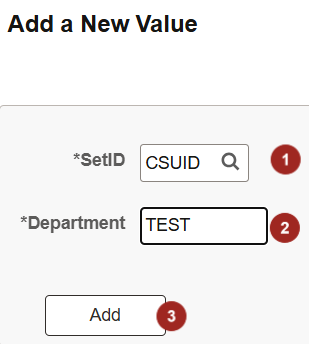
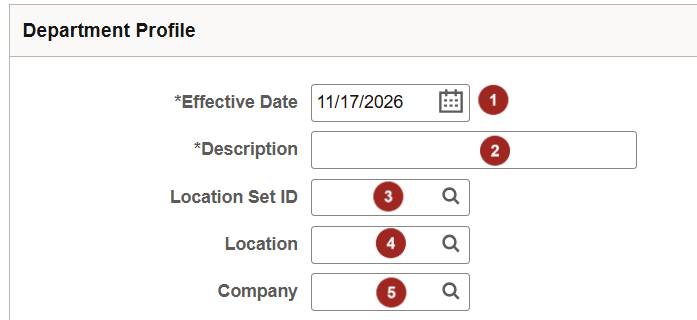
- Complete the Department Profile fields
- Enter the department’s Effective Date. The date should be on or before the effective date of the applicable security tree.
- Enter the department Description and any required short description.
- Enter the department’s Location SetID, if applicable.
- Enter the department's Location, if applicable.
- Enter the Company associated with the department. Leave this field blank if the department will be shared by multiple companies.
- Select the appropriate Manager Type:
o None – No department manager is assigned.
o EmplID – Assign a manager by employee ID. If you select EmplID, you must also complete the Manager ID field.
o Position – Assign a manager by position number. If you select Position, you must also complete the Manager Position field.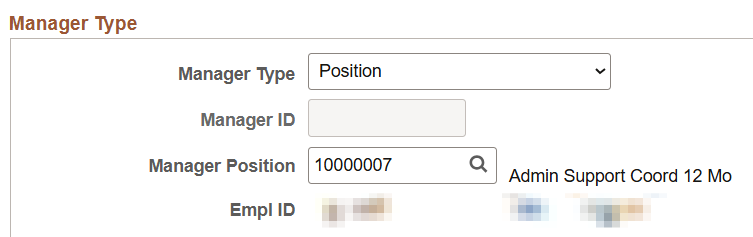
- Complete the applicable budgeting, tax location, and other department fields required by the campus.

- Click Save.

- Add the new department to the appropriate Department Security Tree so authorized users can access related employee data.
- Run the department audit or department tree validation process to confirm that the department exists in both the Department Table and the security tree.
End of article