The following checklist provides a range of audits and tasks that need to be completed by either campus users or CHRS Operations at some point within the calendar year.
Recommended Audits - Campus
Query:CSU_TL_CTO_BALANCE – This report captures compensatory time balances, including overages. Campuses must review all employees’ Time & Attendance records to ensure that all time entries have been entered, approved, and processed before determining final payout amounts.
After the paydown amount has been verified, enter the paydown in Time & Labor Timesheet using the CTOPD (CTO Paydown) code. Post the paydown as a positive number using CTOPD; post it against the last day of the year 12/31/YY.
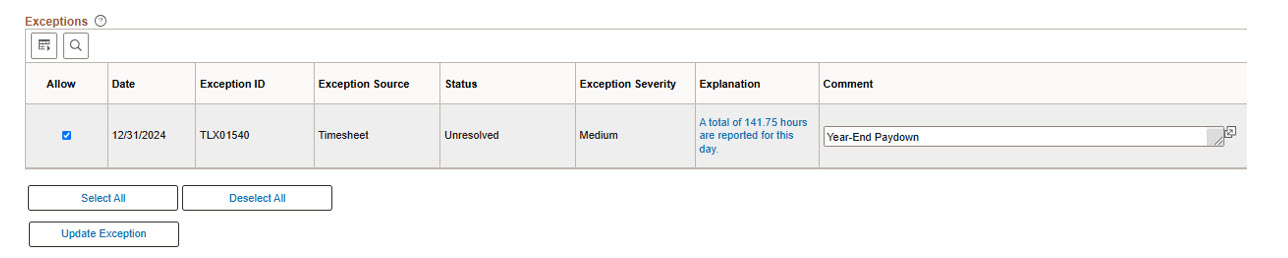
If the paydown amount exceeds 24 hours, the system will generate an Exception. In this case, clear the exception by selecting the Allow checkbox and entering the reason the exception in the Comment field (e.g. Year-End Paydown), then click Update Exception
Configure Yearly - Campus
Job Aid - Create Balance IDs
Job Aid - Create Pay Run ID
Job Aid -Create Pay Calendars
Job Aid - CSU Pay Tape Period
Job Aid - Holiday Schedule Setup
Configure Yearly - CHRS Operations
During the months of July and August, CHRS Operations will provide campuses with a list of setup errors related to the Balance ID, Pay Run Table, and Pay Calendar Table. Campuses will be responsible for making the necessary corrections within a two-week timeframe upon receipt.
Loading 2 years at a time.
- Navigation: MenuSet UP HRMSInstallProduct Specific Time and Labor Configuration
Job Aid- Pending INC0651225
- Navigation: Menu>Set Up HCM > Product Related > Time and Labor > Time Periods > Build Time Period Calendar
Job Aid- Pending INC0651220
- Navigation: Menu>PeopleTools > Utilities > International > Time Zones
Job Aid- Pending INC0651219
Navigation: Menu Set Up HCM Product Related TL Time Periods Complex
Job Aid- Pending
Configure Yearly - CHRS App Dev
During the month of July, before the start of August, the TLWRKSTD Run Control should be updated for all production campuses to include the new aid year for the following academic year.
End of Article
You are done. Great job!