
Background
PeopleSoft allows employees to enter and assign a ‘Phone Type’ to phone numbers they provide. The phone type is picked from a drop-down list in Person Data. Employees can then indicate if the number is their ‘Preferred’ phone, meaning it would be used if the employee needs to be contacted, for phone contact lists, and given to third party providers. Every employee must have a ‘Preferred’ phone selected. The preferred phone should not be the Business phone type.
In 2013 during analysis performed for prior CHRS work, the following values were recommended:
BUSN=Business
CELL=Mobile
HOME=Home
MAIN=Main
OTR=Other
PGR1=Pager 1
TDD=TDD/TTY
TELX=Telex
The current rule states that employees could make any of those values their ‘Preferred’ phone except BUSN.
If the employee did not have a phone, or did not wish to provide one, the type of ‘Other’ was selected and the words ‘Decline to state’ were to be entered in the phone number field (required if a phone type is selected). This satisfied audit requirements so employees who chose not to provide a phone number were allowed to do so. This is problematic as employees revise and change their own phone numbers via self-service.
During subsequent review and analysis during the current CHRS phase (2017 and onward), campuses have been provided with an abbreviated list of values, along with how certain values will be mapped during CHRS conversion.
Issues
- The Phone Type list in PeopleSoft is an XLAT table. Over time, campuses have added their own values to it, increasing the number of table values to 45, most of which are in use by only a single campus.
- Many of these campus-specific values are similar to ones created at other campuses which makes standardization critical to consolidate the list for the single database.
- The ‘Decline to state’ requirement has proven to be problematic as the phone number field where the data entry is done is free text, resulting in lack of consistency about what is entered. Also, not every campus selected the Phone Type of ‘Other’ for the Decline to State group, as this is something that is not maintained centrally but done by all employees via self-service.
- PeopleSoft will default the phone number format to 999/999-9999 if the user enters only the numbers, but it can be overwritten if the number is entered using other formats (parentheses, etc.) While these numbers are all valid it does create issues with reporting.
Analysis
Standardization of Phone Type values
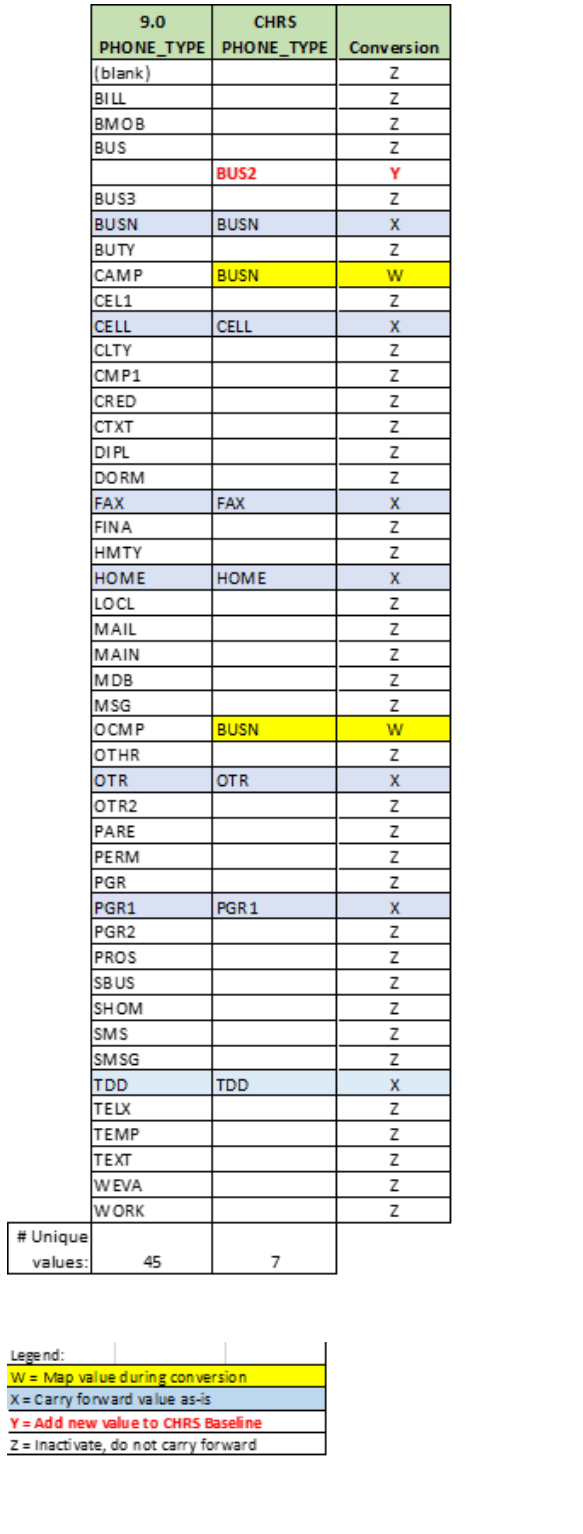
There are 45 non-standardized values in PeopleSoft 9.0 (9.0 PHONE_TYPE). During analysis that was reduced to 8, paying particular attention to those that are in use by the majority of campuses. Refer to the Phone Type conversion mapping analysis in the Appendix for details.
HR values that are shared by CS (Campus Student system), that are obsolete, or have been confirmed that campuses do not require them for CHRS will not be carried forward. All campus values will remain in CS.
Formatting of Phone Number
As mentioned above, a variety of formats may be used during data entry such as use of parentheses, dashes, or periods (see below) which can cause issues with reports or exports to third parties:
Sample non-standard formats:
(999)999-9999
999-999-9999
999.999.9999
PeopleSoft default format (recommended):
999/999-9999
Recommendations
Recommended Phone Types for CHRS are as follows:
Code | Description | Purpose |
|---|---|---|
BUSN | Business | Employee on-campus phone |
BUS2 | Business2 | Employee off-campus business phone |
CELL | Cellular | Employee cell phone |
FAX | Fax | Employee fax |
HOME | Home | Employee home phone (i.e., land line) |
OTR | Other | May be used for any type not described above |
PGR1 | Pager | Employee pager |
TDD | TDD/TTY | Text based device for hearing impaired |
- BUSN, CELL, FAX, HOME, OTR, PGR1 and TDD values will be carried forward as-is to CHRS during conversion, and BUS2 is a newly created value. No other values will be available in CHRS.
- BUSN will continue to be used as the employee on-campus office phone. Any campuses using something other than BUSN for on-campus phone will need to notify the Standardization/Conversion team prior to their conversion so it can be mapped from the correct phone type.
- BUS2 is a newly-created baseline value that will be added to be used for employees’ off-campus business phones. If campuses are using a different type for this – we can map during conversion
- Special notes regarding Phone Type ‘MAIN’
- MAIN will be mapped to OTR during conversion for any campuses that use it.
- If an employee has both MAIN and OTR on their record, the value in OTR will carry forward to CHRS.
- If a campus wants their values in MAIN to be mapped to one of the above recommended codes, they will need to notify the Standardization/Conversion team prior to their conversion.
- Once finalized, campuses can make requests for new or additional values by initiating a ticket in ServiceNow.
Recommended process changes:
- Effective immediately, Employee Phone Number is recommended but no longer required. Since the majority of new employees coming in to the CSU will use CHRS Recruiting and specify their phone number to ensure prompt and easy contact with the recruiter, the prospect of missing phone numbers is minimized. Since phone number is not required in PeopleSoft, no additional coding or configuration is required to support the change.
- To support the recommendation, campuses should send out a reminder near the end of each year reminding employees to keep their contact information up to date.
- As a result of not requiring the phone information, the requirement for employees to enter ‘NONE-DECLINE TO STATE’ if they choose not to provide one is abolished. You may be asked by Systemwide HR (SWHR) to review Personal Phone Numbers for represented employees to report to the union. A recommendation was made that if there is no Personal Phone Number an employee can enter all zeroes (‘000-000-0000’). Note: This recommendation is not retroactive and does not need to be done by HR. When employees are resurveyed or reaching out to employees at the request from SWHR, the zeroes can be entered at that time by the employee in self-service if there is no Personal Phone Number on file. If HR chooses to add the zeroes on the employee’s behalf it is at campus discretion.
- Effective immediately, HR Audits pertaining to review and correction of missing phone information and enforcing the requirement that BUSN should not be the ‘Preferred’ phone will no longer be required.
- Any campuses that load a BUSN phone via integration can continue to do this, and it will be automatically tagged as ‘Preferred’ if no other phone exists.
- Since the Phone Type ‘OTR-Other’ will be carried forward, if campuses wish to preserve their ‘Decline to state’ information, it is suggested that campuses perform a review and clean-up of any ‘Decline to State’ records attached to other types prior to conversion to ensure they are carried forward.
Considerations
- Not all campuses load BUSN phone via Integrations. If they do not wish to put in a mod to automate, and continue to enter them manually, and it is the only phone number, the system will require the user to mark the Phone Type as ‘Preferred’.
- After Conversion for CHRS, the first time a person enters the system the system will notify them to review their personal data, specifically the phone and email addresses, as these values are not effective dated, and employees may exist in multiple campus databases.
The employee should review their information in self-service and update if needed.
Cross-Functional Impacts (Positive / Negative)
- Benefits Administration: N/A
- Labor Cost Distribution: N/A
- Workforce Administration: N/A
- Time & Labor: N/A
- Absence Management: N/A
- Temp Faculty: N/A
- Recruiting: N/A
CHANGE IMPACT
To be filled out by BSA (from Change Impact Tracking log):
| Module | Map ID | Change Impact Log ID | Map Name | Impact Type | % of Employees Impact |
|---|---|---|---|---|---|
| N/A |
The following items will be answered / addressed by Change Management:
Areas of potential change resistance to proposed HR process / policy changes?
Campuses may resist changing to a consistent process that may not fit their needs as well.
Potential resource needs in order to plan, engage, prepare, and/or deploy the change?
Communication/change management. Staff may be needed to review and update phone information if they wish to preserve the ‘Decline to State’ information.
Associated costs relative to the scope of the change to requirements requested?
None, except potential staff time.
Training needs or if a straightforward change?
This is a straightforward change.
Implication on any other related process / functions?
Self-service - After Conversion for CHRS, the first time a person enters the system the system will notify them to review their personal data, specifically the phone and email addresses, as these values are not effective dated, and employees may exist in multiple campus databases.
The employee should review their information in self-service and update if needed.Union impact (meet & confer recommended)? Additional comments from Labor rep?
No reasonably foreseeable impacts within the scope of bargaining identified at the time of review.
APPENDIX: Phone Type Conversion Mapping Analysis
End of Article