
Background
As campuses move toward the Common Human Resources System (CHRS), it is necessary to adopt standard practices that will work in a consolidated environment. Standardization across the CSU for the utilization and maintenance of citizenship data is also necessary as campuses will be sharing employees that prior to CHRS were tracked in separate databases. Since the official system of record for Form I-9 documentation is Tracker I-9 Complete (commonly referred to as ‘I-9 Tracker’), and PeopleSoft 9.2 will not include document upload capabilities, the only Form I-9 related data that will be housed in CHRS (PeopleSoft 9.2) is only that which is absolutely required by the system. For example, PeopleSoft must have selected fields completed on the Identification page so that the 825 field on the PPT prints correctly. Historical data related to the I-9 form will also be maintained in Tracker I-9 Complete, and is not necessary to be maintained in PeopleSoft 9.2.
To ensure consistency across campuses this paper will cover the following areas:
- Citizenship/Passport Data Entry
- Visa/Permit Data Entry
- Renewal/Change in Citizenship
- Historical Records
- Conversion
- Summary of Recommendations
Issue
Campuses have different business processes for entering, tracking, and generating the 825 field on the PPT for non-citizen employees. With a shared environment and the possibility of campuses sharing employees, a standard process is required.
Analysis
The information was reviewed, recommendations were created, and this position paper was developed by a task force of individuals from different campuses. During the analysis phase of the task force’s work, the following was reviewed:
- How campuses enter data on the Citizenship/Passport Page
- What campuses should be entering on the Citizenship/Passport Page
- What values campuses used for different visa types
- What values campuses should be using for the different visa types
- What visa combinations created the correct coding on the PPT for the 825 field
- What campuses were entering on the Visa/Permit page
- What campuses should be entering on the Visa/Permit page
- Legal Requirements
- What I-9 Tracker could do
Recommendations
- Citizenship/Passport tab Data Entry:
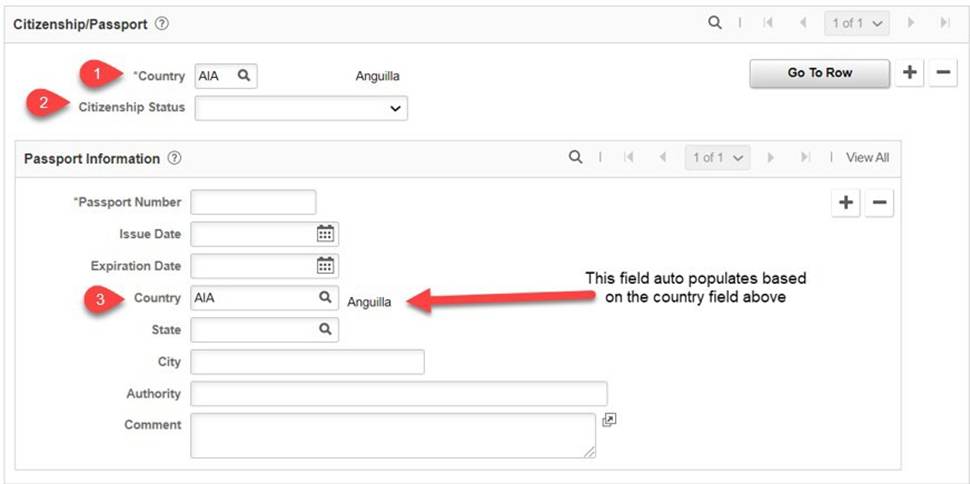
- Since the official system of record for Form I-9 documentation is Tracker I-9 Complete, this page should be left completely blank except for two fields; Country and Citizenship Status. These fields should only be completed and updated when a new employee is hired or there is a change in citizenship status. (Note: A third field, Country located in the Passport Information section, will auto populate with the same value entered in the Country field in the Citizenship/Passport section.
- Country (Citizenship/Passport section) - Location the individual is from (if US Citizen put USA)
- Citizenship Status - for US/Naturalized Citizens only (please refer to the CHRS Data Dictionary for applicable values).
- Country (Passport Information section) - auto populates based on information entered above.
- Since the official system of record for Form I-9 documentation is Tracker I-9 Complete, this page should be left completely blank except for two fields; Country and Citizenship Status. These fields should only be completed and updated when a new employee is hired or there is a change in citizenship status. (Note: A third field, Country located in the Passport Information section, will auto populate with the same value entered in the Country field in the Citizenship/Passport section.


- Visa/Permit tab Data Entry:
- The fields noted below should be the only ones completed for an employee, and all others should be left blank. Depending on the individual’s citizenship status, one of the following should be followed:
- If the employee is a US citizen, leave page completely blank
- If and when the employee becomes a naturalized citizen, all information on the Visa/Permit tab should be deleted using Correction mode.
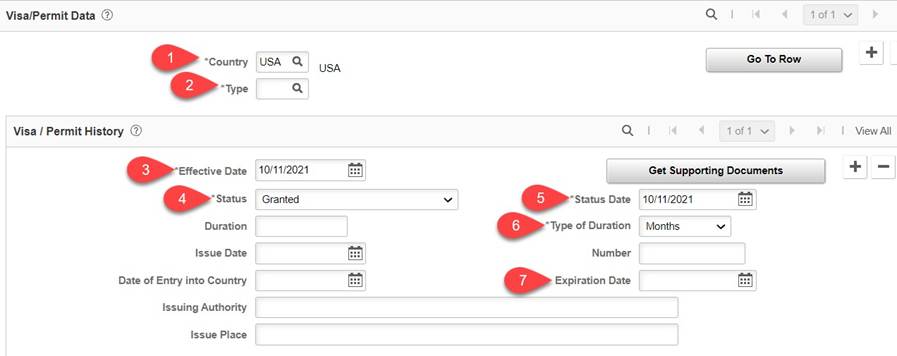
- If the employee is a non-US citizen, complete the following fields:
- Country - Country should always be USA
- Visa Type -See Visa Type Entry section II
- Effective Date - effective date of appointment
- Status - Select granted, other values should not be used
- Status Date - Effective date of appointment
- Type of Duration - Defaults to Months, no action required.
- Expiration Date - date of expiration (if the employee is a Permanent Resident, leave blank). For renewals do, not create an additional row, just update/change the expiration date
- The fields noted below should be the only ones completed for an employee, and all others should be left blank. Depending on the individual’s citizenship status, one of the following should be followed:
Visa Type Entry for PPT 825 field: Below is the majority of the visa types used by the CSU and information on how they should be entered into PeopleSoft. Keep in mind that the purpose of entering this information is to print the 825 field correctly on the PPT, not to create a report or have the correct combination of documents for employment that would be required for the actual I-9. For example, the Fiancé of a U.S. Citizen (K1) visa holder is required to have an employment authorization with category A06, whereas PeopleSoft only requires one row of entry using the K1 code. For a complete list of codes remaining active or being deactivated in CHRS, see Appendix A and Appendix B at the end of this document.
For more information on Item 825 requirements please see the PIMS Manual.
| Visa Type | Number of Rows required in the Visa/Permit Tab | Values to Enter | PIMS 825 Field |
|---|---|---|---|
| Asylum Applicant | 1 (One) | ASA | PIMS 825 code= Z-CCY*-MMYY |
| Child of K-3 (LIFE Act) | 1 (One) | K4 | PIMS 825 code= Z-CCY*-MMYY |
| DACA |
2 (Two) | U, EA
Note: value Ushould only be used for those that are DACA |
PIMS 825 code= Z-CCY*-MMYY |
| E-1 Treaty Trader & Imdt Fmly | 1 (One) | E1 | PIMS 825 code= Z-CCY*-MMYY |
| E-2 Treaty Invstr & Imdt Fmly | 1 (One) | E2 | PIMS 825 code= Z-CCY*-MMYY |
| E-3 Specialty Occupation | 1 (One) | E3 | PIMS 825 code= Z-CCY*-MMYY |
| E-3D Dependent | 1 (One) | E3D | PIMS 825 code= Z-CCY*-MMYY |
| E-3R Returning E-3 | 1 (One) | E3R | PIMS 825 code= Z-CCY*-MMYY |
| F-1 Student (Academic) |
2 (Two) | Student Employees: F1, ION
Staff: F1, EA | PIMS 825 code= F-CCY*-MMYY |
| H-1B Temp Specialty Occupation | 1 (One) | H1B | PIMS 825 Code = Z-CCY*-MMYY |
| H-2A Temp Agricultural Worker | 1 (One) | H2A | PIMS 825 code= Z-CCY*-MMYY |
| H-2B Other Temp Worker | 1 (One) | H2B | PIMS 825 code= Z-CCY*-MMYY |
| H-3 Trainee | 1 (One) | H3 | PIMS 825 code= Z-CCY*-MMYY |
| H-4 Dependents H1-H3 | 1 (One) | H4 | PIMS 825 code= Z-CCY*-MMYY |
I Media Rep & Imdt Fmly
| 1 (One) | I | PIMS 825 code= Z-CCY*-MMYY |
| International Cultural Exchange (Q1 Visa Holder) | 2 (Two) | Q1, ION | PIMS 825 code= Q-CCY*-MMYY |
| J-1 Exchange Visitor | 1 (One) | J1 Note: This is a change from 9.0 since in 9.0 this transaction requires an additional row. | PIMS 825 code= J-CCY*-MMYY |
| J2 Dependents of J1 | 2 (Two) | J2, EA | PIMS 825 code= J-CCY*-MMYY |
| K-1 Fiancé of a U.S. Citizen | 1 (One) | K1 | PIMS 825 code= Z-CCY*-MMYY |
| K-3 Spouse of a U.S. Citizen | 1 (One) | K3 | PIMS 825 code= Z-CCY*-MMYY |
| L-1 Intracompany Transferee | 1 (One) | L1 | PIMS 825 code= Z-CCY*-MMYY |
| L-2 Dependents of L1 | 1 (One) | L2 | PIMS 825 code= Z-CCY*-MMYY |
| O-1 Extraordinary Ability | 1 (One) | O1 | PIMS 825 code= Z-CCY*-MMYY |
| O-2 Accompanying O1 | 1 (One) | O2 | PIMS 825 code= Z-CCY*-MMYY |
| O-3 Dependents of O1-O2 | 1 (One) | O3 | PIMS 825 code= Z-CCY*-MMYY |
P-1 Athlete/Entertainment Grp
| 1 (One) | P1 | PIMS 825 code= Z-CCY*-MMYY |
P-2 Artist/Entertainer Exchange
| 1 (One) | P2 | PIMS 825 code= Z-CCY*-MMYY |
P-3 Artist/Entertainer Cultural
| 1 (One) | P3 | PIMS 825 code= Z-CCY*-MMYY |
| P-4 Dependents P1-P3 | 1 (One) | P4 | PIMS 825 code= Z-CCY*-MMYY |
| Permanent Resident | 1 (One) | IAT Special Instructions: Do not put expiration date regardless if one is provided since it is not required for renewal. Note: The expiration date on the card is to be used by employers for someone who is newly hired, employers cannot accept one that is passed the expiration date | PIMS 825 code= Z-CCY*-0000 |
| V-1 Spouse Lawful Permanent Resident | 1 (One) | V1 | PIMS 825 code= Z-CCY*-MMYY |
V-2 Child Lawful Permanent Resident
| 1 (One) | V2 | PIMS 825 code= Z-CCY*-MMYY |
V-3 Derivative Lawful Permanent Resident
| 1 (One) | V3 | PIMS 825 code= Z-CCY*-MMYY |
| TN Canadian/Mexican Business | 1 (One) | TN | PIMS 825 code = Z-CCY*-MMYY |
*CCY is a coding value from the PIMS Manual. The CC is for the country and the Y is for Tax Status. For CC, if the individual is from a Tax Treaty Country than the appropriate coding should be used otherwise if the employee is a nonresident alien from the country that does not have a tax treaty agreement with the US or is a resident alien than OO should be used (Example: Z-OOR-MMYY). The CCY values should autogenerated on the PPT based on the country entered on the Citizenship/Passport section. For Y, depending on the employee’s tax status either an R or N should appear after the CC. For more information on the PIMS 825 Code, please reference the PIMS Manual.
- Renewal/Change in Citizenship Status
- Since the official system of record for Form I-9 documentation is Tracker I-9 Complete, the following should be entered for current and returning employees.
- Current Employees:
- Naturalization
- On the Citizenship/Passport tab update/change the Country to USA and put “Citizen” in the Citizenship Status field
- On the Visa/Permit page, delete all information.
- Then go into Job Data, insert a row with the effective date of the change. If the visa status changes mid-month, the effective date should be the following month. Use the action/reason Data Change/Change Non-Citizen Status with the empl history remark ‘CITIZEN’.
- Renewal: Leave the Citizenship/Passport tab as is. On the Visa/Permit tab, only update/change the expiration date field. Then go into Job Data, insert a row with the effective date of the change. If the visa status changes mid-month, the effective date should be the following month. Use the action/reason Data Change/Change Non-Citizen Status with the empl history remark ‘EXTEND WAED’.
- Naturalization
- Rehired Employees:
- If the employee returns prior to I-9 destruction and has previous history in PS, delete history and only have the current record. Make sure that the Citizenship/Passport and Visa/Permit tabs are completed following the instructions mentioned in the previous sections.
- If the employee returns after I-9 destruction and has previous history in PS, delete history and only have the current record. Make sure that the Citizenship/Passport and Visa/Permit tabs are completed following the instructions mentioned in the previous sections.
- Current Employees:
- Since the official system of record for Form I-9 documentation is Tracker I-9 Complete, the following should be entered for current and returning employees.
- Historical Records
Since the official system of record for Form I-9 documentation is Tracker I-9 Complete, not PeopleSoft, moving forward in 9.2 campuses need to make sure when they update citizenship information in PeopleSoft and remove any historical information the employee may have in the system. Only the most current history should be recorded. If a campus has not done so already, it is also recommended that they transfer any historical information in PeopleSoft to Tracker I-9 Complete by at least uploading the I-9’s of all non-citizen employees. The conversion system does not have the ability to distinguish between a visa requiring one record versus two and therefore not able to bring over selective records.
This means that historical information that should not be housed in PeopleSoft will remain until the campus deletes the information. Campuses should delete all non-current information for an employee when they are updating/changing anything on the Citizenship page. This also means that certain codes will need to be converted to match the codes agreed upon for each visa type. If your campus has a code that is campus created and not showing under the following map, please contact the conversion team.
Visa/Permit Conversion Map 9.0 Visa Type
CHRS Visa Type
IED
EA
ARI
IAT
- Recommendation Summary
- Since the official system of record for Form I-9 documentation is Tracker I-9 Complete, going forward it is strongly recommended that campuses begin importing historical records of all active non-citizens into Tracker I-9 Complete prior to converting to CHRS in order to have reporting capabilities and tracking mechanisms in use by the time they go live with CHRS.
- It is strongly recommended that campuses begin to follow the guidance of this position paper prior to go live. This means a possible process change that would include entering a limited amount of data, and removing all historical data when updating citizenship data for a current employee using the recommended matrix above.
Considerations
Because Tracker I-9 Complete is the official system of record for Form I-9 documentation and where all data elements should be kept, any campus that does not complete the upload of historical records for non-citizen I-9 information into the Tracker will be responsible for monitoring their own employees.
There will be no reporting functionality available in 9.2.
Cross-Functional Impacts (Positive / Negative)
Campuses will finally have standardized guidance on how/what should be entered into PeopleSoft to generate the correct 825 field on the PPT. This will require campuses to change current practices in how they maintain citizenship data in PeopleSoft.
CHANGE IMPACT
To be filled out by BSA (from Change Impact Tracking log):
| Module | Map ID | Change Impact Log ID | Map Name | Impact Type | % of Employees Impact |
|---|---|---|---|---|---|
| N/A |
The following impact areas should be addressed by the Position Paper author(s) or a relevant stakeholder/approver. All items should have a response.
Areas of potential change resistance to proposed HR process / policy changes?
Tracker I-9 Complete will be the system of record for this information which may necessitate a process change for campuses who are not currently using it.
- Potential resource needs in order to plan, engage, prepare, and/or deploy the change?
Require campuses to begin transitioning current citizenship data out of PeopleSoft and into I-9 Tracker.
Associated costs relative to the scope of the change to requirements requested?
None.
Training needs or if a straightforward change?
This position paper has information that will assist campuses on this change.
Implication on any other related process / functions?
None.
Union impact? Any additional comments from Labor rep?
No reasonably foreseeable impacts within the scope of bargaining identified at the time of review.
APPENDIX A: CHRS Active Visa Type
Visa/Permit Type | Visa/Permit Classification | Description |
|---|---|---|
| AR1 | Visa | Alien Registration |
| ASA | Residence | I-589 Asylum Applicant |
| B1 | Visa | B-1 Visitor for Business |
| B2 | Visa | B-2 Pleasure/Prospect/Exchange |
| C2 | Visa | C-2 Transit to &from U.N. HQ |
| C3 | Visa | C-3 Accrd Foreign OfclTranst |
| D | Visa | D Crewman |
| E1 | Visa | E-1 Treaty Trader &Imdt Fmly |
| E2 | Visa | E-2 Treaty Invstr &Imdt Fmly |
| E3 | Visa | E-3 Specialty Occupation |
| E3D | Visa | E-3D Dependent |
| E3R | Visa | E-3R Returning E-3 |
| EA | WorkPermit | I-766 Employment Authorization (Previously I-765 Employment Authorization) |
| F1 | Visa | F-1 Student (Academic) |
| H1A | Visa | H-1A Registered Nurse |
| H1B | Visa | H-1B Temp Specialty Occupation |
| H2A | Visa | H-2A Temp Agricultural Worker |
| H2B | Visa | H-2B Other TempWorker |
| H3 | Visa | H-3 Trainee |
| H4 | Visa | H-4 Dependents H1-H3 |
| HSP | WorkPermit | US High SchoolWork Permit |
| I | Visa | I Media Rep &Imdt Fmly |
| IAT | Residence | I-551 Temp (I94 &Passport) |
| ION | WorkPermit | Int'l Stdnt Wrk Pmt (Previously Int'l StdntOn-Campus Wrk Pmt) |
| J1 | Visa | J-1 Exchange Visitor |
| J2 | Visa | J-2 Dependents of J1 |
| K1 | Visa | K-1 Fiance of a U.S. Citizen |
| K3 | Visa | Spouse of a U.S.Citizen |
| K4 | Visa | Child of K-3 (LIFEAct) |
| L1 | Visa | L-1 Intracompany Transferee |
| L2 | Visa | L-2 Dependents of L1 |
| M1 | Visa | M-1 Student (Voc/Non-Academic) |
| N | Visa | N Special Immigrant Family |
| O1 | Visa | O-1 Extraordinary Ability |
| O2 | Visa | O-2 Accompanying O1 |
| O3 | Visa | O-3 Dependents of O1-O2 |
| P1 | Visa | P-1 Athlete/Entertainment Grp |
| P2 | Visa | P-2 Artist/Entertainer Exchnge |
| P3 | Visa | P-3 Artist/Entertainer Culturl |
| P4 | Visa | P-4 Dependents P1-P3 |
| Q1 | Visa | Q-1 Intl Cultural Exchange Prg |
| T1 | Visa | Non-immigrant Individual |
| T2 | Visa | Non-immigrant Spouse |
| T3 | Visa | Non-immigrant Child |
| T4 | Visa | Non-immigrant Parent |
| T5 | Visa | Non-immigrant Sibling < Age 18 |
| TN | Visa | TN Canadian/Mexican Business |
| TPS | Visa | Temporary Protected Status |
| U | Visa | Non-US citizen, undetermined |
| U1 | Visa | Non-immigrant Individual |
| U3 | Visa | Dependent of U1 Visa Holder |
| V1 | Visa | Spouse Lawful Permanent Res |
| V2 | Visa | Child Lawful Permanent Res |
| V3 | Visa | Derivative Lawful Permanent Res |
APPENDIX B: CHRS Inactivated Visa Type
Visa/Permit Type | Visa/Permit Classification | Description |
|---|---|---|
| A1 | Visa | A-1 Diplomat &Imdt Fmly |
| A2 | Visa | A-2 Othr Gov Ofcl & ImdtFmly |
| A3 | Visa | A-3 Personal Emply of A1-A2 |
| AMN | Residence | I-690 Amnesty Applicant |
| BBP | Visa | B1/B2 Visitor Businss/Pleasure |
| C1 | Visa | C-1 Imdt & Continuous Transit |
| F2 | Visa | F-2 Dependents of F1 |
| G1 | Visa | G-1 Principl Rcg & ImdtFmly |
| G2 | Visa | G-2 Accredited Rcg & ImdtFmly |
| G3 | Visa | G-3 Principl Unrcg &Imdt Fmly |
| G4 | Visa | G-4 Offcr Emply &Imdt Fmly |
| G5 | Visa | G-5 Personal Emply of G1-G4 |
| IOF | WorkPermit | Int'l Stdnt Off-Campus Wrk Pmt |
| K2 | Visa | K-2 Children of K1 |
| M2 | Visa | M-2 Dependents of M1 |
| R1 | Visa | R-1 Religious Worker |
| R2 | Visa | R-2 Dependents of R1 |
| TD | Visa | TD Dependents of TN |
| VWP | Visa | Visa Waiver Program |
End of Article