
Background
To assist in identifying and removing dependents who have reached the age limit for benefits, campuses may require a report to identify these dependents who are enrolled in Medical and/or Dental plans.
Issue
Currently there is no standard query to assist with this process.
Analysis
Identify any dependent, who is enrolled in Medical and/or Dental benefits, who will reach the age of 26 in the next 90 day period.
Recommendations
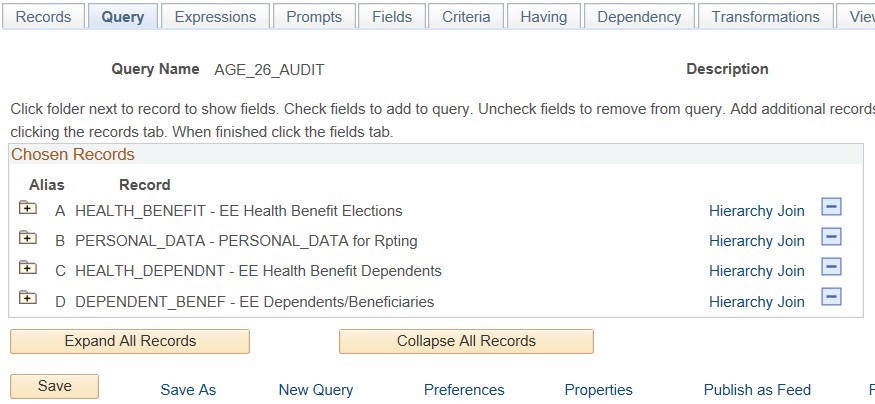
Create a report using Query, adding all of the records shown in the screen shot with the following standard joins:
- Join Personal_Data to Health_Benefits
- Join Health_Dependnt to Health _Benefit
- Join Dependent_Benef to Health_Dependnt
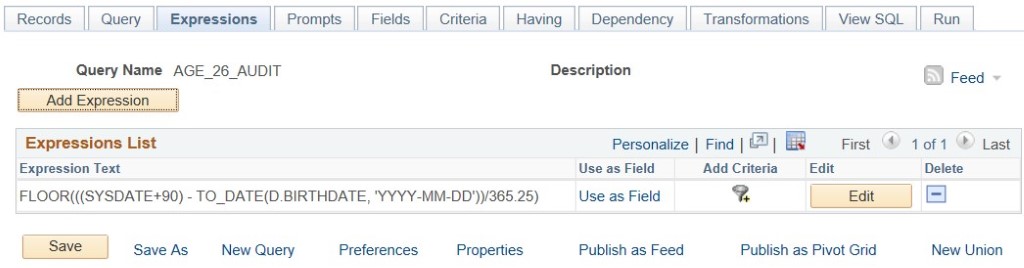
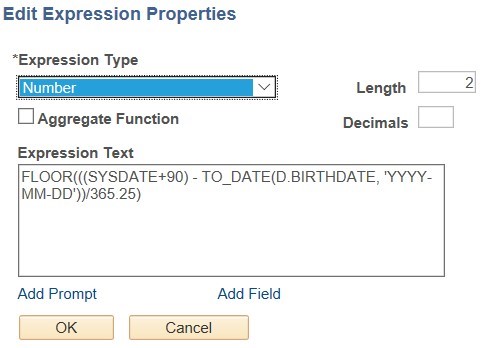
Enter the following value into the Expression Text field: FLOOR(((SYSDATE+90) - TO_DATE(D.BIRTHDATE, 'YYYY-MM-DD'))/365.25)
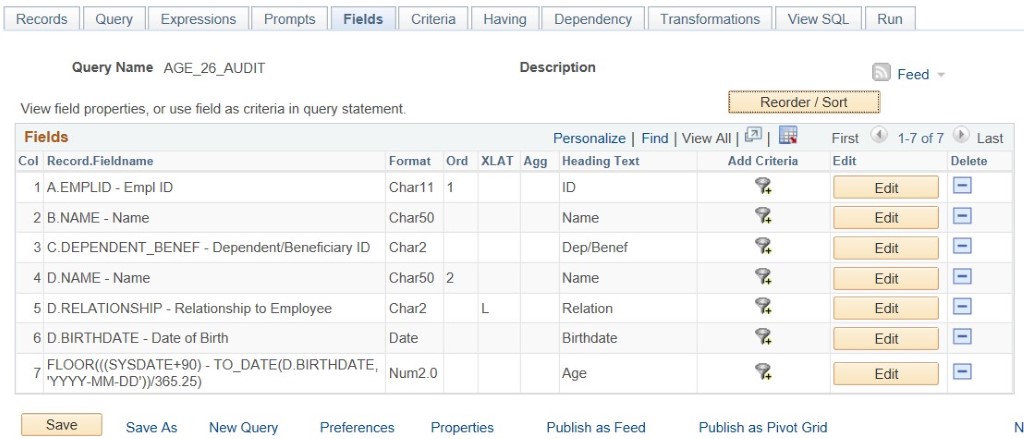
Select the following list of Fields from the corresponding record
Criteria must be Modified and Added as noted in the steps below
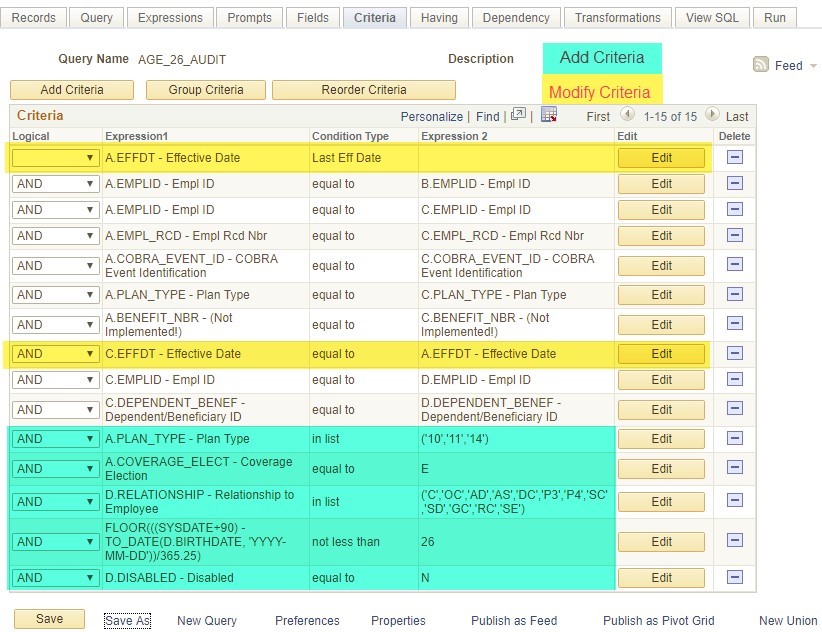
Modify Criteria:
- Update the Effective Date criteria for the HEALTH_BENEFIT record. Initially it will look like this:

This criteria will cause any corrections you make, with a future dated effective date, to continue to appear on the report until that date. To prevent this, edit this criteria and select the following condition type;
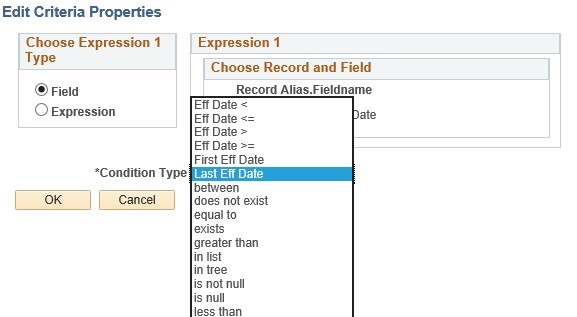
The criteria will then look like this (as seen above);

- When adding the DEPENDENT_BENEF record, PeopleSoft Query will automatically add the following criteria to the system;

This criteria will not report all of the dependents that should be included. This will need to be edited to the following;
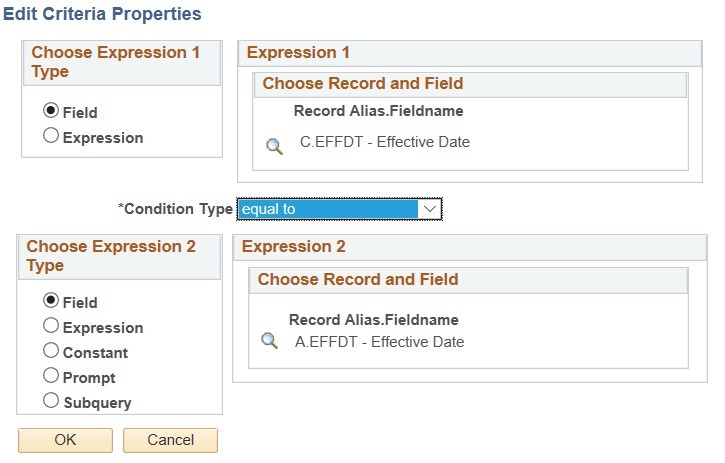
The criteria will then look like this (as seen above);

Add Criteria:
- Limit Plan Type (record A) to 10 (medical), 11 (dental), and 14 (vision)
- Limit Coverage Elect to only E (Elect) for only those employees enrolled in the plans
- Limit Relationship of dependents to only those type relevant to children
- Exclude dependents under the age of 26
- Exclude dependents marked as Disabled
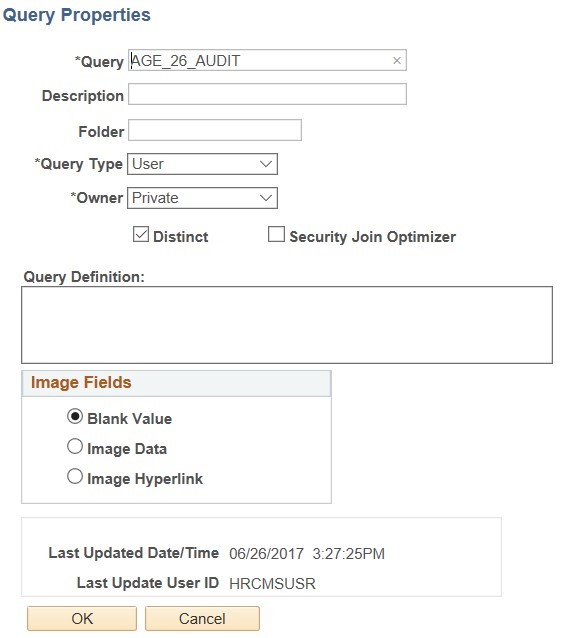
Save the Query: Finally, edit the query properties and select the Distinct check box.
SELECT
P.EMPLID, P.NAME, H.PLAN_TYPE, H.BENEFIT_PLAN, H.COVRG_CD, X.DEPENDENT_BENEF,
D.NAME, D.RELATIONSHIP, D.BIRTHDATE,
FLOOR(((SYSDATE+90) - TO_DATE( TO_CHAR(D.BIRTHDATE,'YYYY-MM-DD'), 'YYYY-MM-
DD'))/365.25) AS AGE
FROM
PS_HEALTH_BENEFIT H, PS_PERSONAL_DATA P, PS_HEALTH_DEPENDNT X,
PS_DEPENDENT_BENEF D
WHERE
H.EMPLID = P.EMPLID AND H.EFFDT =
(SELECT MAX(H1.EFFDT)
FROM PS_HEALTH_BENEFIT H1
WHERE
H1.EMPLID = H.EMPLID AND
H1.EMPL_RCD = H.EMPL_RCD AND
H1.COBRA_EVENT_ID = H.COBRA_EVENT_ID AND
H1.PLAN_TYPE = H.PLAN_TYPE AND
H1.BENEFIT_NBR = H.BENEFIT_NBR) AND
H.PLAN_TYPE IN ('10', '11') AND
H.COVERAGE_ELECT = 'E' AND
H.EMPLID = X.EMPLID AND
H.EMPL_RCD = X.EMPL_RCD AND
H.COBRA_EVENT_ID = X.COBRA_EVENT_ID AND
H.PLAN_TYPE = X.PLAN_TYPE AND
H.BENEFIT_NBR = X.BENEFIT_NBR AND
H.EFFDT = X.EFFDT AND
X.EMPLID = D.EMPLID AND
X.DEPENDENT_BENEF = D.DEPENDENT_BENEF AND
FLOOR(((SYSDATE+90) - TO_DATE( TO_CHAR(D.BIRTHDATE,'YYYY-MM-DD'), 'YYYY-MM-
DD'))/365.25) >= 26 AND
D.RELATIONSHIP IN
('C','OC','SC','SD','GC','SE','AD','AS','DC','P3','P4','RC') AND
D.DISABLED = 'N';
Considerations
Access to Query Manager would be required to build the report or the SQL included could be executed by a campus technical resource.
Cross-Functional Impacts (Positive / Negative)
None.
CHANGE IMPACT
To be filled out by BSA (from Change Impact Tracking log):
Module | Map ID | Change Impact Log ID | Map Name | Impact Type | % of Employees Impact |
|---|---|---|---|---|---|
BA | 41 | 191 | Manage COBRA Events | People, Process | <10% |
BSA – Please answer the following:
Areas of potential change resistance to proposed HR process / policy changes?
No resistance is expected. The position paper provides instructions to build a consistent and repeatable reporting process for all campuses to identify dependents reaching age 26.
Potential resource needs in order to plan, engage, prepare, and/or deploy the change?
The work involved in building the report is designed so that any employee with basic experience with PeopleSoft Query Manager can complete the steps.
Associated costs relative to the scope of the change to requirements requested?
Employee time to build, test, and save the query is less than 4 hours. The ongoing process would be to run the report monthly to identify dependents about to reach age 26 and process a benefit event to unenroll them based on their date of birth.
Training needs or if a straightforward change?
No specific training is needed.
Implication on any other related process / functions?
None.
End of Article