
Table of Contents
High-Level Business Process Diagram
1.1 CSU Current State
1.2 Advantages of Implementing Self-service
1.3 Dependencies
2.1 Personal Data – View and/or Updates
2.2 Job Data – View Compensation
3.1 Benefits Current Challenges
3.2 Advantages in CHRS
4.1 Advantages in CHRS
5.1 Advantages in CHRS
7.0 Labor Cost Distribution - View Pay Check
7.1 Advantages in CHRS
8.0 Temporary Academic Employees (Formerly Known as "Temporary Faculty")
8.1 Advantages in CHRS
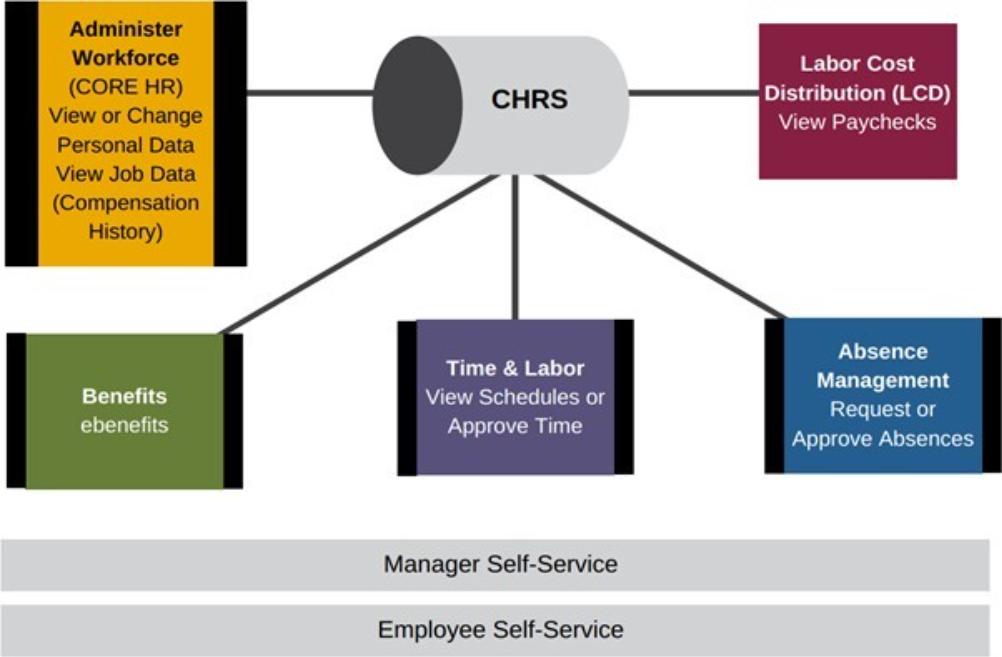
High-Level Business Process Diagram
Introduction
1.0 Background
This document captures the recommendations proposed for self-service by the CHRS module design teams. These recommendations are supported by SWHR, the CHRS Program Team and were approved by the CHRS Steering Committee. Information on the benefits campuses will gain by implementing self-service are noted and system-wide adoption is encouraged as a means to assist the CSU in meeting organizational business efficiencies as part of the overall CHRS program. Additionally, the implementation of self-service may allow CSU to address challenges acknowledged in the initial CHRS Feasibility study and enable the CSU to meet market demands to attract and retain employees who expect mobile capabilities and robust technology as part of their day-to-day work functions. All modules are noted as optional for campus implementation, except Absence Management. (This approach aligns with the current CSU policy). Details are provided in each section of the respective module.
1.1 CSU Current State
Campus response to the HCM Survey results (data as of November 2015) indicate that although self- service is used to a large degree, the level of that usage varies by campus.
Results are noted below by module:
Workforce Administration (and Labor Cost Distribution)
Up to 88% of the campuses allow employees to make updates using Self-Service. Address updates by employees is typically allowed by 75% of the campuses, and 88% allow them to update their Emergency Contacts, and 83% allow them to update their Phone Numbers.
- View Compensation History is allowed 71% of the time.
Labor Cost Distribution
- When polled, View Paycheck was being utilized by 58% of campuses
| Self-Service Functions | Not Using | Update | View Only |
|---|---|---|---|
| Address Change | 4.17% | 75.00% | 16.67% |
1 | 18 | 4 | |
| Disability Data | 16.67% | 54.17% | 16.67% |
4 | 13 | 4 | |
| Email Addresses | 8.33% | 54.17% | 29.17% |
2 | 13 | 7 | |
| Emergency Contacts | 4.17% | 87.50% | 4.17% |
1 | 21 | 1 | |
| I-9 | 83.33% | 4.17% | 0.00% |
20 | 1 | 0 | |
| Phone Numbers | 4.17% | 83.33% | 4.17% |
1 | 20 | 1 | |
| Preferred Name Change | 45.83% | 29.17% | 12.50% |
11 | 7 | 3 | |
| Veteran Status | 16.67% | 62.50% | 8.33% |
4 | 15 | 2 | |
| View Compensation History | 20.83% | 0.00% | 70.83% |
5 | 0 | 17 | |
| View Paycheck | 37.50% | 0.00% | 58.33% |
9 | 0 | 14 |
Benefits
Self-Service functionality is used as follows:
- View Benefits Summary 83%
- View Dependent Information 63%
- Change benefits during open enrollment 25%
- Enroll in Benefits 21%
- Change benefits from resulting Life Event changes 13%
Absence Management
- Self-service for staff and Management Personnel Plan (MPP) is used by 92% of the campuses.
- Up to 79% are using some form of self-service entry for faculty.
| Self-Service Functions | Not Using | Staff/MPP | Faculty |
|---|---|---|---|
Approve Absences | 4.17% | 91.67% | 75.00% |
1 | 22 | 18 | |
Alt/Proxy Approval | 16.67% | 70.83% | 58.33% |
4 | 17 | 14 | |
Balance Inquiry-Employee | 0.00% | 91.67% | 79.17% |
0 | 22 | 19 | |
Balance Inquiry-Manager | 0.00% | 91.67% | 75.00% |
0 | 22 | 18 | |
| Balance Inquiry-Timekeeper | 0.00% | 91.67% | 70.83% |
0 | 22 | 17 | |
| Timekeeper Absence Review | 0.00% | 91.67% | 70.83% |
0 | 22 | 17 | |
| View/Enter Absences-Employee | 4.17% | 91.67% | 70.83% |
1 | 22 | 17 | |
| View/Enter Absences-Manager | 4.17% | 91.67% | 79.17% |
1 | 22 | 19 | |
| View/Enter Absences- Timekeeper | 4.17% | 91.67% | 75.00% |
1 | 22 | 18 |
Time and Labor
| Self-Service Functions | Not Using | Students | Hourly Employees | Other |
|---|---|---|---|---|
Timesheet-Elapsed Time | 29.17% | 41.67% | 45.83% | 29.17% |
7 | 10 | 11 | 7 | |
Timesheet-Punch Time | 58.33% | 29.17% | 20.83% | 8.33% |
14 | 7 | 5 | 2 | |
Reported Time Approval | 41.67% | 41.67% | 33.33% | 12.50% |
10 | 10 | 8 | 3 | |
Payable Time Approval | 25.00% | 66.67% | 50.00% | 20.83% |
6 | 16 | 12 | 5 | |
Schedule Management | 58.33% | 4.17% | 4.17% | 25.00% |
14 | 1 | 1 | 6 | |
View Only | 54.17% | 8.33% | 8.33% | 8.33% |
13 | 2 | 2 | 2 |
Temporary Faculty
N/A
1.2 Advantages of Implementing Self-service
Implementing self-service at a campus will provide the opportunity for the CHRS benefits to be realized, namely
- provide administrative efficiencies
- Improved user experiences in the HR applications, including enabling future mobile access to HR services
- Assist the CSU in attracting best of breed employees by meeting the digital expectations of potential new employees
1.3 Dependencies
Self-service functionality provides online access to a variety of employee functions. Depending on the service, employees may have view, update and/or, be able to initiate a request. In addition, some self-service change requests may require HR, Benefits or Payroll validation and be accompanied by additional paper documentation to support the online request. In order to ensure that the data accessed and viewed by employees is current and accurate, timely coordination of information updated in the system by departments is critical and must be in place. To facilitate appropriate employee access, campus roles will be established by function and authentication will be necessary for employees to access their respective self-service links/pages. Campuses will then need to assign the respective role to appropriate users. Having various levels of employee access will affect campus training and security needs.
2.0 Workforce Administration
The recommendation from the design team is to enable as many features for HR self-service as possible. Using self-service will allow the administrative work to be distributed. A list of the types of HR transactions recommended for inclusion in self-service are noted below:
2.1 Personal Data – View and/or Updates
- Home and Mailing Address
- Home or Mobile Phone
- Preferred Name
- Personal Email (view only Business Email)
- Emergency Contact
- Opt out of Union Reports (custom CSU functionality)
- Veteran Status*
- Disability Status*
- Ethnicity*
*Certain features will be restricted by security.
Employees will not be allowed to update or maintain the following categories via eProfile:
- Education, Degrees, Schools, Licenses and Certifications
These changes will be entered via CHRS Recruiting or by Administrative Staff in Human Resources Given the current implementation with CHRS Recruiting, the following items will need to be reviewed to
determine if they will be available as self-service options in PeopleSoft or the CHRS Recruiting (PageUp) system. In either case, the plan is to allow new hires to verify, add or update their information directly, including completing a portion of the I-9 form.
2.2 Job Data – View Compensation
Employees and managers can view compensation history. The Compensation History page displays various types of compensation changes that were applied. A link is provided to allow additional information about the corresponding compensation change to be reviewed. (CSU will need to determine if this function will be enabled with Release 1.)
3.0 eBenefits
Similar to the Workforce Administration module (Human Resources), the Benefits design team strongly recommended the use of eBenefits. Systemwide (HRM) Benefits supports this recommendation and advocates that campuses try to implement self-service after the first year of going-live with CHRS if eBenefits functionality is not included in their initial roll-out. There are many efficiency gains both to the employee and the CSU. The self-service, Benefits page is the starting place for employees to access their benefits information. Employees use eBenefits to review, add, and update their benefit’s plan information. They are able to communicate their benefit choices, see summary level and more detailed, information about their health plan enrollments as well as review information about their dependents and beneficiaries. For CHRS, Life Events will have a guided process through eBenefits. Employees can enter information about recent life events such as marriage, child birth/adoption, or divorce and upload Life Event documents for the type of event being processed. (Benefits administrators can then review and approve or reject the documents).
3.1 Benefits Current Challenges
In the current environment, there are many challenges to timely enrollments, primarily because Benefits relies on information and has touchpoints with CalPERS and data supplied to the State Controller’s Office. Reconciling records and daily, weekly, and monthly auditing are the norm. Benefits Office uses various methods to identify benefits eligible employees. Paper enrollment forms are provided to the employee. Employee submits enrollment form(s) to the Benefits office, the Benefits Office contacts the employee for supporting documentation, the Benefits Office creates the initiating event in PeopleSoft to process the transaction. The Benefits Office completes enrollment data entry in PeopleSoft, then the Benefits Office prepares vendor enrollment forms.
To leverage delivered functionality and provide control and validation of enrollments in eBenefits the design team will expand delivered events to include 12 total. This will allow many transactions to be performed through self-service. While the benefits staff create the second list of events, elections are still completed by the employee in eBenefits.
The following life events can be initiated and completed by the employee directly from the PeopleSoft self- service menu.
| Event Code | Description |
|---|---|
ADP | Adoption |
BIR | Birth |
PCR | Parent-Child Relationship |
DIV | Divorce of Spouse or Domestic Partner |
MAR | Marriage/Registered Domestic Partnership |
LTE | Late Enrollment |
The following events are created by benefits staff when notified and the employee completes elections using self-service.
| Event Code | Description |
|---|---|
NEW | Hire or Newly Eligible |
DGC | Dependent Gained Coverage Elsewhere |
DLC | Dependent Loses Coverage Elsewhere |
EGC | Employee Gains Coverage Elsewhere |
ELC | Employee Loses Coverage Elsewhere |
OE | Open Enrollment |
3.2 Advantages in CHRS
There are several benefits to implementing eBenefits, primarily efficiencies gained by streamlining the process. In addition:
- Documents can be uploaded with Life Events, thus eliminating the need for subsequent communications to obtain supporting document
- Documents will be stored in a secure, electronic repository
- A document review and approval process will be established for the Benefits Staff
- There will be automation of the Permitting Event Codes required by CalPERS. (This is a reason code for the transaction being processed that is manually determined today.)
- Enrollment forms with data elements will pre-populate on the employee enrollment form, reducing manual data
- eBenefits will accommodate and meet the CSU’s electronic Signature Authorization form signature requirements, reducing the need for wet signatures
4.0 Absence Management
A significant change for Absence Management in CHRS is the use of the PeopleSoft delivered system. Per current policy, use of Absence Management self-service is required for “Staff employees”. This requirement remains in place for CHRS. Using the delivered system, employees can use Absence Management to enter online requests for absences, view current and future absence balances, and run the Absence Forecasting process. Managers and administrators can also use self-service pages to approve, deny (for correction), or push back (trigger for correction) absence requests. Requests that are entered through the self-service pages are treated as actual absences once they are approved, and are included in the Absence Take process.
4.1 Advantages in CHRS
Use of absence and expanding the capabilities to leverage more delivered features like forecasting, will enable timely processing of absences. Manual paperwork should diminish as all approvals are tracked online.
Additionally, with forecasting enabled, employees will have a better understanding of their time available before making a request. Specific new features to be offered in CHRS are:
- Ability to request compensable absences rather than just reporting leave/time taken
- Forecasting will be available for 12 months ahead and will trigger a hard-stop when appropriate
- Retroactivity will capture 12 months behind
- Elimination of Prior Period Entry Adjustment process
- Employee will have ability to cancel, edit, and resubmit an absence transaction
- Fluid will be enabled
5.0 Time and Labor
The recommendation is to utilize self-service for time entry and approvals. Time will be entered using elapsed time and punch time. (Rapid time will not be available). Complex calendars will be delivered to make the start and end dates for calendar periods better align with the campus and SCO’s calendars. Fluid will be turned on and Work Centers will make it easier for central groups like Payroll to manage activities and tasks. Manager self-service Fluid will also be leveraged for Time Approvals. Approvers/Managers will be approving Payable Time.
Time and Labor timesheet will be utilized for overtime and Compensating Time Off (CTO).
5.1 Advantages in CHRS
- Schedules, Time and Overtime will available via self-service for entry and approval
- Real time rules will be used, which will enable accurate time reporting (especially for work study). The system will immediately display exceptions
- Improved auditing
- Elimination of paper
- Transparency
6.0 Recruiting (PageUp)
Currently CHRS Recruiting is in implementation phase. Information on self-service features will be added at a future date.
7.0 Labor Cost Distribution - View Pay Check
Employees may login to view a snapshot of their paycheck. This data reflects the elements found on the State- issued pay stub (deductions, gross, net, retirement contributions, etc.) for CSU employees. For CHRS a standardized View Paycheck will be developed.
- The YTD total will be calculated the same way the SCO does it on paychecks/direct deposits slips
- This will provide all users with easy access to payroll data, thereby reducing calls to the Payroll Department
7.1 Advantages in CHRS
- Employees will be able to view their paycheck on line at anytime
- Functionality will be available to all campuses, benefitting those that do not currently have it today
8.0 Temporary Academic Employees (Formerly Known as "Temporary Faculty")
It is a contract requirement that employees in both the R03 and R11 bargaining units receive timely notification of the terms of their appointment and provide positive acknowledgement. The improvements to the baseline Temporary Academic Employees’ Module to incorporate self-service for both the Employee and the Managers meet those requirements. Employee self-service will have standard appointment templates with concise language and the improved automated processes will ensure accurate data and may reduce the number of grievances. These modifications will also allow for better tracking of employee notifications, declined units, concurrent/additional appointments and supports audit requirements.
8.1 Advantages in CHRS
Leveraging Employee self-service functionality combined with Workflow will expand the Temporary Academic Employees mod capabilities and reduce the manual paperwork since all approvals/routing can be tracked online. Additionally, Employee self-service will allow for the employee/candidate to complete additional information needed for hiring such as candidate certification statements and provide the ability to self-identify concurrent/additional employment. Specific new features to be offered in CHRS are:
- Ability to electronically route the appointment to various staff and appointing authority for approval prior to sending to employee/candidate.
- New self-service Page for employee/candidate will ensure the employee is aware in real time of the current status of their appointment and courses assigned.
- New self-service page will provide the ability for the employee/candidate to acknowledge all or part of the assignment and to also provide additional commentary back to the department.
- Audit controls and tracking of notifications will ensure we are compliant with contract requirements.
- Reporting capabilities will increase and provide better transparency.
9.0 Security
Security and role setup will need to be developed when giving access to self-service functionality. Self-service transactions are targeted to specific roles, e.g. employee, approver, manager. These roles help determine:
- The transactions that an employee can access
- The information that an employee can view
User profiles determine default access to transactions and a role can be assigned to each user profile.
Profiles are linked to permission lists. Permission lists identify the pages that users can access. User profiles also control the data that each employee can access.
As with all elements of security, a user’s role on campus and the functionality and access with respect to their job or campus affiliation requirements must be considered when determining access to the various modules of the system. General security rules must be in place to limit campus access to their respective employee populations (e.g., employee records). Campuses will be responsible for managing this level of security.
10.0 Appendix - Definitions
Employee: An individual currently paid through the Uniform State Payroll System including represented, management, executives, non-represented employees, student assistants and rehired annuitants “designated via an active classification/job code listed on the CSU Salary Schedule”.
Employee self-service: A PeopleSoft application that allows authorized employees to view, submit transactions/requests, enter data, enroll and facilitate other functions related to their employee profile, such as address, emergency address, etc.
Manager self-service: A PeopleSoft application that allows managers and authorized employees (e.g., timekeepers) to view, approve transactions/requests, enter data, enroll and facilitate other functions on behalf of their direct reports.