
Purpose
To identify any positions that have never been used, and will never be used (have no job data in past or current incumbents), and flag them so they are not carried forward into CHRS. This will help
minimize the occurrence of invalid or “garbage” data in CHRS, and facilitate review of conversion warnings and errors associated with position data.
Campuses will have control over which positions are to be updated to ensure any valid positions (i.e., upcoming hires) can be carried forward.
Campuses will need to follow these steps:
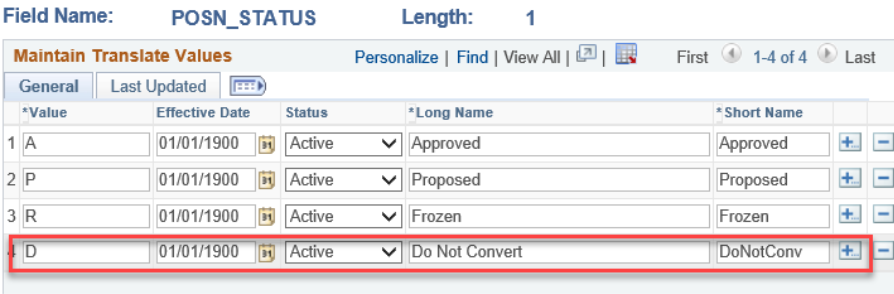
- Add a new translate value of ‘D-Do Not Convert’ for Position Status to the XLATITEM table which will enable them to flag positions not to be converted:
Navigation:

Enter a new value by inserting a row in POSN_STATUS as follows:
Effective Date – 01/01/1900
Status – Active
Value – D
Long Name – Do Not Convert
Short Name – DoNotConv
- Run the SQL below in the Production database to identify positions that should be reviewed:
SELECT DISTINCT COMPANY, POSITION_NBR, TO_CHAR (EFFDT,'YYYY-MM-DD'), EFF_STATUS, DESCR, DEPTID, JOBCODE, POSN_STATUS
FROM PS_POSITION_DATA WHERE POSITION_NBR NOT IN
(SELECT DISTINCT A.POSITION_NBR FROM PS_JOB A
Where POSITION_NBR = A.POSITION_NBR)
order by 3
- Correcting the Positions
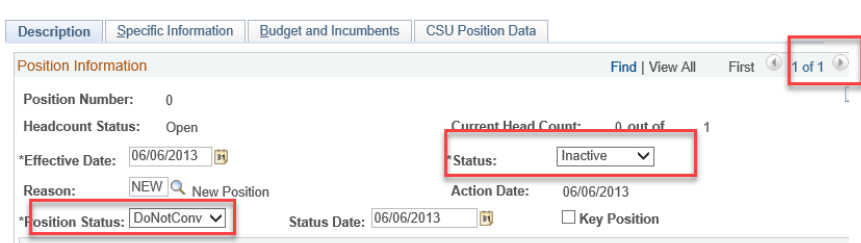
Delete all rows except the first row.
Inactivate the position.
Correct the position status to ‘Do Not Convert’
- Review and action Errors from Position Conversion. During review, any positions that have been flagged ‘Do not convert’ can be skipped.
Important Notes:
- During conversion any POSN_STATUS of ‘D’ will not be converted, and will not produce any errors related to this position.
- If you do not have access to SQL – ask your developer to run the SQLs as described below and send you the results.
- After a thorough review in your test database, repeat all of the steps outlined above in Production.
End of Article