
Background
After a benefit event is created in PeopleSoft, benefits administration will flag the event as being disconnected when the data that the system used to track it, process it, or both was deleted and/or if one or more of the HR records used for eligibility does not exist as of the event date.
Issue
Benefit events can become disconnected by data deletions and/or data corrections. When an effective date of a particular address or job information record is changed in correction mode, the system simultaneously creates a new participant event with the revised date and disconnects any participant events with the previous date.
Once an event is disconnected, it can no longer be processed by the system. Any data rows written to the base benefit tables cannot be identified, updated or removed except by voiding with an administrative action.
Voiding disconnects is important for any event that may have changed employee benefits. The purpose of the Void process is to remove any rows from the base benefit tables that were created by the event. In the case of a finalized termination event that inserted termination rows into base benefit tables, the disconnected event must be voided to remove the termination of benefits.
Analysis
If an event has a process status that indicates data entry was finalized, or perhaps initiated and the event is now disconnected, it should be voided. It is recommended that all TER events in a Finalized Enrolled status be voided. Disconnected events with the following status should be voided or at least reviewed to determine if election entry was saved into the base benefit tables;
- Election Error (EE)
- Entered (ET)
- Finalized Enrolled (FE)
- Notified (NT)
- Re-Enter (RE)
If it is expected that nothing was written to base benefits, voiding the event would not be necessary such as when an event is disconnected before it is finalized. Disconnected events with the following status would not need to be voided since benefits administration did not prepare options, did not finish option preparation, or no data entry took place;
- Program Elig Assign Error (AE)
- Program Elig Assign None (AN
- Program Elig Assigned (AS)
- Finalized Benefit Pgm None (FA)
- Finalized Prepared None (FP)
- Prepare Error (PE)
- Prepared (PR)
Recommendations
Navigation: Manage Automated Events>Events>Run Automated Event Processing
On the first page, enter the applicable Schedule ID (the following screen shot is an example for the EM schedule).
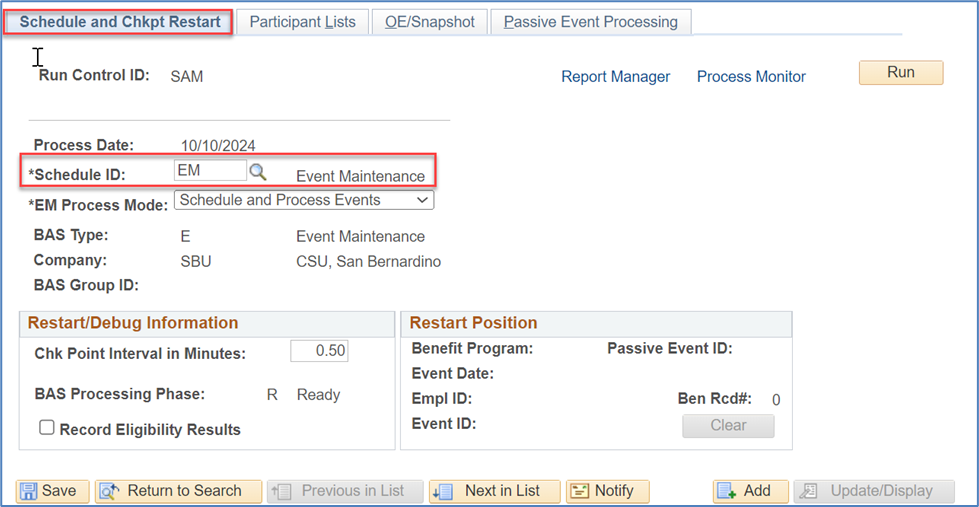
Click on the second tab Participant List to go to the second page.
Put a checkmark in the Process from Participant List checkbox.
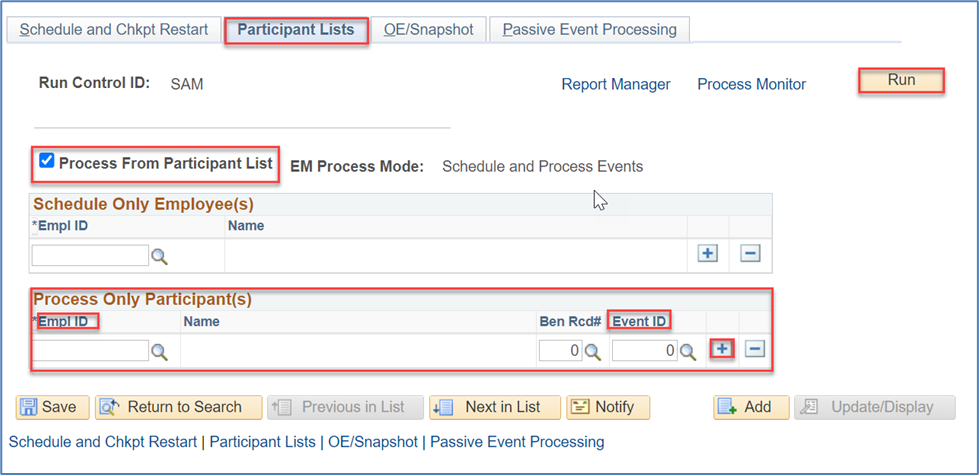
Go to the second (bottom) section on that page, enter the EMPLID and the BAS Event ID to void.
Click on the + button to add additional rows to enter additional EMPLIDs and Event IDs to void.
Click on the Run button after you have entered all EMPLIDs/Event IDs to void.
Go to the LAST process in the process list where it says PSPBARUN.
Check mark that process and click on OK.
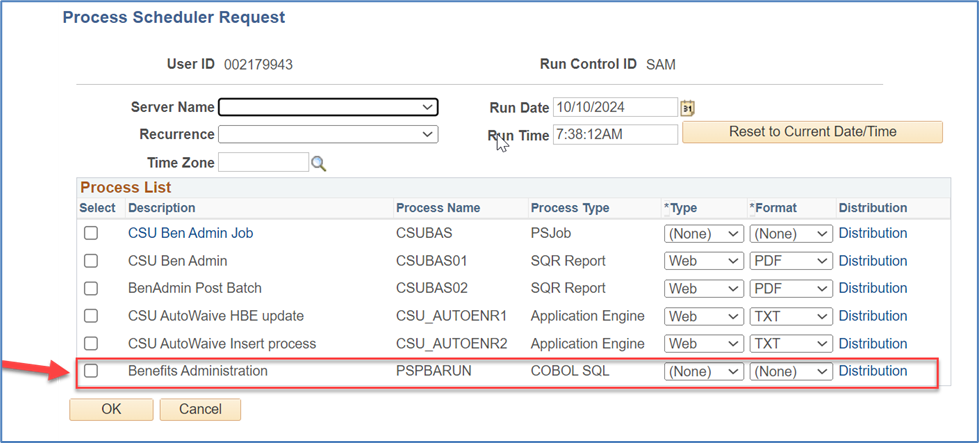
Click on the Process Monitor link and Refresh the page until the process completes.
Once you have completed voiding disconnected BAS events, just to make sure the EE doesn't have any benefit plan coverage begin or end effective date issues in PIMS, please reprocess the employee's BAS events just past the voided disconnected BAS event forward through to the most recent BAS event (use the screen shot of the page that you took at your processing list). That way we can be sure coverage effective dates are correct in PeopleSoft. If an effective coverage date is incorrect in PIMS, the employee will be on the monthly CSU Payroll Deduction Audit Report.
Considerations
Disconnected benefit events can happen for various reasons. Identification and determination of required action is an ongoing task that all benefit administrators and/or benefit staff undertake as part of regular auditing/reporting, at a minimum, on a monthly basis before interfaces are generated.
Cross-Functional Impacts (Positive / Negative)
Data entry, especially changes and deletions, in Workforce Administration directly impacts benefits workload. When feasible, and for benefits eligible employees, it is helpful to communicate changes to benefits eligibility. Most importantly, the reversal (deletion) of terminations before the job row is deleted. This allows the benefits staff to void the termination and ensure the activation of benefits for uninterrupted coverage.
CHANGE IMPACT
To be filled out by BSA (from Change Impact Tracking log):
Module | Map ID | Change Impact Log ID | Map Name | Impact Type | % of Employees Impact |
BA | 47 | 185 | Workforce Admin- Initiate or Change Enrollment | Process, People | 10% |
The following items will be answered / addressed by Change Management:
Areas of potential change resistance to proposed HR process / policy changes?
This is to improve data integrity and quality, and cross-module coordination.
Potential resistance with campus resources bandwidth for data audit/ maintenance in lieu of other campus priorities. This is a data cleanup function that needs to be done once a month at minimum before they send their interfaces (send data to vendors). Impact of inactive benefits discrepancies is currently unknown. It’s important to keep systems in sync, and there should be regular maintenance/ audit of data. There is a GRP for having this done automatically in the system to void these disconnecting events. Until the auto feature is in place, granted GRP approval, campuses require manual cleanup processing to maintain data integrity.
Potential resource needs in order to plan, engage, prepare, and/or deploy the change?
This is a function on per need basis. Some campuses have dedicated Auditor roles that do analysis on benefit transactions, and this should be incorporated into their regular reviews. For campuses that don’t have a regular dedicated resource, it would need to be added as an audit process.
Associated costs relative to the scope of the change to requirements requested?
Time only. For Maintenance, it would take less than an hour a week. To get to Maintenance only mode, it would require initially about 8 hours a week to cleanup the backlog, which number of hours would reduce over time.
Training needs or if a straightforward change?
If campuses are already doing auditing of events, this is a straight forward change. If it’s a new function for the campus, they need workshop training for how HR and Benefits systems work together. BSA has developed 3 one-hour webinars of how Benefits works, published on SharePoint.
Implication on any other related process / functions?
Vendors impact with incorrect/ out of sync data. Could be having incorrect benefits data in the system now (employee would not be able to find out until they go to the doc office for example, when it’s too late).
HR data entry is creating the issue circumstances for Benefits. Both sides need to understand how their individual actions impact each other’s functions (i.e. HR understanding how HR actions are impacting Benefits transactions)
End of Article