
Purpose
Any DEPTIDs that are not in the Security Tree that are used in a position will error out during conversion.
Therefore, in order to ensure a position is successfully converted, the DEPTID must be in the max effdt department Security Tree even if the department is inactive. Note that a small number of missing DEPTIDs can create a large number of errors, so two SQLs have been provided; one to show the list of missing DEPTIDs from the department Security Tree that are found in position only, and another that has the position number added, and shows the number of errors that would occur during conversion.
Rules for DEPTID in the Department Security Tree (in connection with Position Data):
- All DEPTIDs that are found in position must be in the Department Security Tree even if the department is no longer active
- Any DEPTIDs that are not in a position and never were in position do not need to be in Department Security Tree.
Campuses will need to follow these steps:
- Run the first SQL below to Identify any DEPTIDs not found in the Department Security Tree that are present in a Position Number. Any DEPTIDs that are returned from this SQL need to be added to the most current Department Security Tree.
SQL to show DEPTIDs not found in the Department Security Tree:
select distinct b.deptid
from ps_position_data b
where b.effdt = (
select max(b1.effdt)
from ps_position_data b1
where b1.position_nbr = b.position_nbr
and b1.effdt <= sysdate
)
and not exists (
select distinct 'X'
from pstreenode a
where a.tree_name = 'DEPT_SECURITY'
and a.effdt = (
select max(a1.effdt)
from pstreenode a1
where a1.setid = a.setid
and a1.setcntrlvalue = a.setcntrlvalue
and a1.tree_name = a.tree_name
and a1.effdt <= sysdate
)
and a.tree_node = b.deptid
)
;
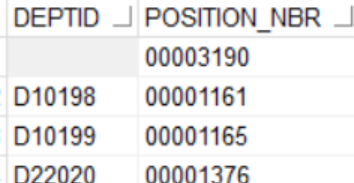
- Run the second SQL. The results will show all missing DEPTID and the Position Number associated with this department. Run this SQL to compare Department Security Tree with the DEPTIDs found in Position, showing the Position Numbers.
If a blank value and a position number is found - it means the department is missing from the position, and the position needs to be corrected.
Example:
SQL to show missing DEPT and Position Number:
select distinct b.position_nbr, to_char(b.effdt, 'YY-MM-DD') AS EFFDT, b.deptid
from ps_position_data b
where not exists (
select distinct 'X'
from pstreenode a
where a.tree_name = 'DEPT_SECURITY'
and a.effdt = (
select max(a1.effdt)
from pstreenode a1
where a1.setid = a.setid
and a1.setcntrlvalue = a.setcntrlvalue
and a1.tree_name = a.tree_name
and a1.effdt <= sysdate
)
and a.tree_node = b.deptid
)
;
End of Article