
Background
During presentation of 9.2 functionality to the Benefits Workgroup, the Search by National ID page was reviewed as an alternative to the baseline customization, CSU ID. The group felt that it provided a unique search feature for benefits to utilize when looking for employees and dependents by social security number.
Issue
Correspondence from benefit providers often contains only a social security number to identify an employee and/or their dependents. In PeopleSoft, all dependent records are found via the employee name or ID. There is no search page to look for a specific dependent by name.
Analysis
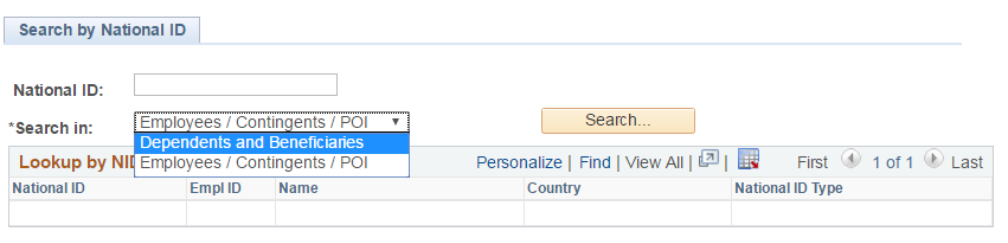
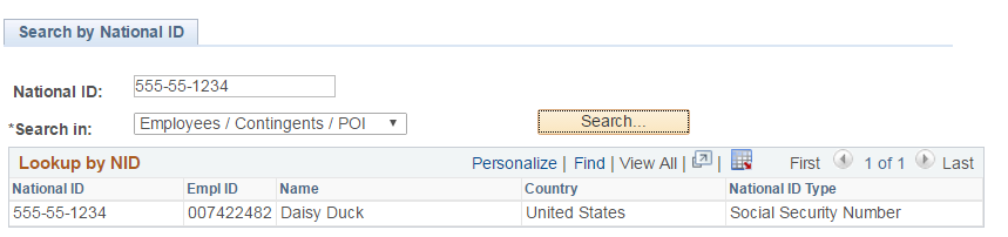
The delivered page, Search by National ID, provides a complete database search of all person types using the social security number.
Navigation: >Workforce Administration >Personal Information >Biographical >Search by National ID
- Locate an employee ID by using the social security number.
- Locate an employee and their dependent(s) by using the dependent social security number.
- Searches can also be made by person of interest and contingent worker.

Recommendations
Update HR and/or Benefit security role/permission list to allow access to the Search by National ID page. Campuses can review the page / functionality to determine applicability in their current processes.
Considerations
Using department security, search results present the same employee list that staff would have access to in other areas of the database. Security access may need to be granted via a new role or permission for staff to view the page.
- Component information for campus security/technical staff to provide update role/permission if necessary:
- Menu: ADMINISTER_WORKFORCE_(GBL)
- Component and Page: NID_LOOKUP
Cross-Functional Impacts (Positive / Negative)
- Benefits Administration: Benefits staff would see a positive impact as they often deal with benefit vendors and social security numbers
- Labor Cost Distribution: N/A
- Workforce Administration: N/A
- Time & Labor: N/A
- Absence Management: N/A
- Temp Faculty: N/A
- Recruiting: N/A
CHANGE IMPACT
To be filled out by BSA (from Change Impact Tracking log):
| Module | Map ID | Change Impact Log ID | Map Name | Impact Type | % of Employees Impact |
|---|---|---|---|---|---|
| BA | 47 | 186 | Workforce Admin - Initiate or Change Enrollment | People, Process, Technology | <10% |
The following items will be answered / addressed by Change Management:
Areas of potential change resistance to proposed HR process / policy changes?
This is a “nice to have” on 9.0 that would roll out in 9.2. No resistance foreseen from the user teams as it benefits them, providing a convenient filtered view in table, can download and sort easily;
Security team at each campus may potentially resist, depending on different security requirements they each have, but if provided good lead time and communication on ‘why’ from CO, potential issues can be mitigated.
Potential resource needs in order to plan, engage, prepare, and/or deploy the change?
Expected 2 hours for Security setup/ programming.
Associated costs relative to the scope of the change to requirements requested?
No associated cost, only time commitment to do the configuration.
Training needs or if a straightforward change?
This is a simple straightforward change to configure view only that has no training needs. The main requirement for successful implementation would be to provide good communication of the navigation to all end users.
Implication on any other related process / functions?
None; it’s providing new accessing pages.
End of Article