
Background
Primary Job Indicator in PeopleSoft Workforce Administration is used to flag an employment instance and identify an appointment as the primary job for an employee. The Job Indicator field is set to ‘Primary Job’ when an employee is first entered into the system. Any concurrent job entered into in the system inserts ‘Secondary Job’ into the Job Indicator field. Currently campuses are responsible for the maintenance of this field via manual process, based on their own business process.
In CHRS Recruiting, PeopleSoft data will be extracted to be pushed into CHRS Recruiting to create users in the recruiting system, and to automatically grant/terminate access to that system. This user file in CHRS Recruiting links an active employee’s Empl ID to the same employee’s Primary Job Position ID. This data will be pulled from PeopleSoft and fed into CHRS Recruiting. If an employee has no primary job indicator flag set to Primary, the user be brought over to CHRS Recruiting without any linkage to a position.
For CHRS Recruiting Wave I, all affected campuses have a process in place which addresses this need. However, since this may not be the case at the rest of the campuses, and it has been determined that this field is crucial for auto completing incumbent and reports_to fields in CHRS Recruiting, this position paper will ensure that everyone is aware of the need to have a process which will result in consistency across the system and to allow all campuses to effectively utilize CHRS Recruiting.
Issue
For campuses that do not have a process in place, there will need to be consistency across the system to ensure the same order of evaluation for multiple records is followed.
Among those with an existing process in place, some are relying on a manual process, which involves periodic review and manual correction to the Primary Job Indicator if needed; others have an automatic process, which nightly maintains the primary job indicator field. However, not all campuses are using the same criteria to determine which position should be identified as the Primary Job.
The Workforce Admin group has written a GRP for CHRS (GRP #123 - WA Primary Job Indicator) that addresses this need in CHRS. However, since Recruiting will be rolled out prior to the CHRS implementation, campuses will need to have a process in place to regularly maintain the primary job field; failing to do so in 9.0 would impact position incumbent and reports_to fields in Recruiting (PageUp).
Analysis
The following campuses have been identified as “Wave I” campuses for CHRS Recruiting (Page Up), and all have a working process in place to maintain the Primary Job Indicator Field:
Fullerton
San Bernardino
San Diego
San Luis Obispo
Stanislaus
The remaining campuses will be polled to identify what process if any is used.
Available options to ensure Primary Job Indicator is maintained are as follows:
- Allow campuses to develop a customized, automatic process via COMR to assign and maintain Primary Job Indicator in their current PRD instance. Although this would automate the process, and minimize the risk of dropping active users due to lack of Primary Job Indicator, campuses would not be prevented from using their own criteria to identify the Primary Job.
- Seek the opportunity to standardize, and adjust the coding for GRP #123 to allow campuses to use the functionality in PeopleSoft 9.0. Since the development work has not been completed yet, adjusting it for 9.0 might require additional time and resources.
- A third option is a hybrid approach of options #1 and #2; share the logic and codes used for GRP #123, and allow campuses to code based on this logic. Each campus will use a COMR process to run the code in their own instance as they prepare to implement Recruiting at their campus. Coding written by the earlier Recruiting implementation waves should be shared with the later waves to ensure the standard processes and criteria are followed throughout. Campus resources will still be needed to adjust the codes to their campus environment.
Recommendations
Due to the fact that GRP #123 will not be ready on time for the Recruiting implementation, and central CMS does not have the capacity to develop the coding in PeopleSoft 9.0, we recommend Option #3; sharing coding planned for use with GRP #123 with each campus to have them to develop their own COMR for Primary Job Indicator maintenance.
If a campus has a process for primary job flag review and correction, it must be complete before 6:00 p.m. The Integration PS to PU - automated data extraction is scheduled at 6:00 p.m. nightly from Sunday through Thursday. Otherwise, it will not be included in the nightly pull by the integration process PS to PU.
Considerations
This change will be on a go-forward basis; retroactive cleanup will not be required.
Cross-Functional Impacts (Positive / Negative)
- Benefits Administration: N/A
- Labor Cost Distribution: N/A
- Workforce Administration: described above
- Time & Labor: described above
- Absence Management: described above
- Temp Faculty: none anticipated, pending more discussion with the team.
- Recruiting: described above
CHANGE IMPACT
To be filled out by BSA (from Change Impact Tracking log):
| Module | Map ID | Change Impact Log ID | Map Name | Impact Type | % of Employees Impact |
|---|---|---|---|---|---|
| WA | 12 | 643 | Update Job | Process |
The following items will be answered / addressed by Change Management:
Areas of potential change resistance to proposed HR process / policy changes?
Campuses may not have the resources or be willing to free up the resources to develop their own COMR.
Potential resource needs in order to plan, engage, prepare, and/or deploy the change?
For now, if campuses have an existing process for identifying Primary Job they can continue with their existing process; alternatively, they can utilize the SQR provided in Appendix B to put CHRS processes in place now. Each campus will need a resource to develop the COMR for this change in PeopleSoft 9.0.
The Business Process Guide will need to be updated (or one created if there is none).
Associated costs relative to the scope of the change to requirements requested?
A resource at each campus will be needed for coding the COMR.
Training needs or if a straightforward change?
Training on the new process will be required.
Implication on any other related process / functions?
An updated process for maintenance of Primary Job Indicator will change the existing process or be a completely new one for campuses who do not use it.
APPENDIX A: Related Documents
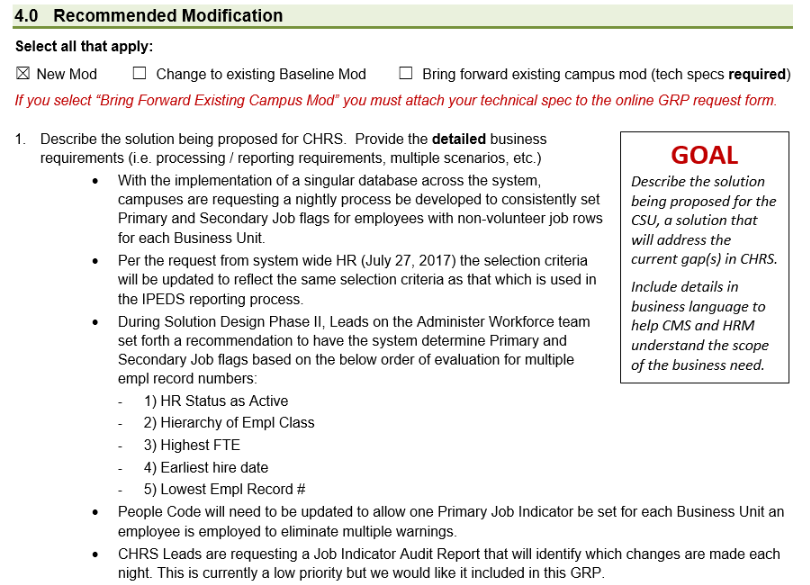
GRP #123 WA Primary Job Indicator (excerpt):
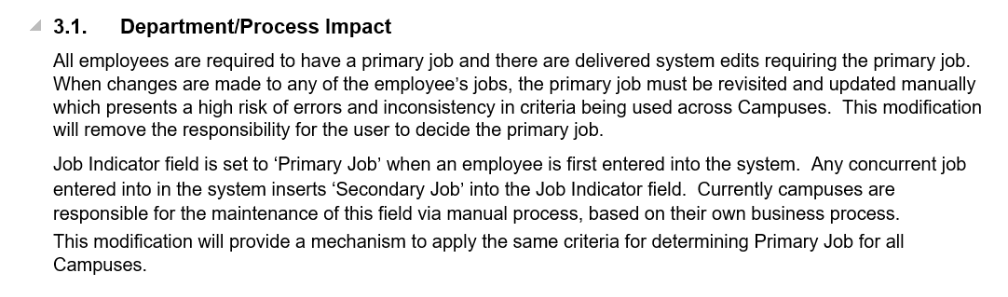
Functional Spec document WA18005 CHRS DS Primary Job Indicator (excerpt):
APPENDIX B: SQR
This SQR is from the San Diego campus, and is used by them to identify primary job indicator and highest education level. The original SQRwas from Fullerton, and highest education level was added. They also modified the logic to meet San Diego’s business process.
Click to View SQR:
!-----------------------------------------------------------------------!
! California State University (CSU) !
! Report Name: SDJOBIND.SQR (used FULAW032.SQR Fullerton) !
! Programmer: Sean Chang (original - Rebecca Ho) !
! Date: 11/7/2002 !
! Title: Set Employee Primary Job Indicator and !
! Set Highest Education level !
!-----------------------------------------------------------------------!
! Program Description !
! ------------------- !
! A. Primary Job Indicator !
! This program sets Active employees' primary job indicator based on !
! the following criteria: !
! 1. If an employee has one job, it becomes the primary job !
! 2. If an employee has multiple jobs, the job with the highest FTE !
! will be the primary job and in case of Tie, the lowest EMPL_RCD !
! will be selected. Three following exceptions will have the !
! priority to above criteria. !
! a. Department Head, Job codes 2481,2482,2361,2360, 2354, 2325 !
! b. Assistance Dean, Job code 3070, 3072 and not department 50070 !
! c. Not any of the following departments !
! 42009, 42011, 42012, 42013, 42022, 42026, 44007, 47006, !
! 47011, 48016 !
! !
! B. Highest Education Level !
! 1. Fixes all the Highest education Level Discrepancies. !
! 2. Reports all employees who do not have any accomplishment but !
! Highest Education level is set. (USER MUST FIX THE ISSUE MANUALLY) !
!-----------------------------------------------------------------------!
! Output: !
! ------ !
! - Employee Primary Job Report !
!-----------------------------------------------------------------------!
! Table Referenced Description Usage !
! ---------------- ----------- ----- !
! PS_CSU_BEN_RPT_TBL CSU Benefits Reporting Values Select !
! PS_JOB Employee Job Data Select !
! Update !
! PS_PERSONAL_DATA Employee Personal Data Select !
!-----------------------------------------------------------------------!
! Modifications !
!-----------------------------------------------------------------------!
! Date-Mod By Description !
! ----------- ----------- !
! 8/18/2016 SDSU- Shahriyar Dadkhah !
! 1/11/2017 Update to fix the ranking of few accomplishments!
! 2/21/2017 Added PHARMD and reset the Highest_EDUC_LVL !
! 2/27/2018 Updated the priority for job code 2358 & 2359 !
! 08/02/2018 Added tow new Accomplishments Code
!-----------------------------------------------------------------------!
! Set environment.
!-----------------------------------------------------------------------!
#Include 'setenv.sqc'
!-----------------------------------------------------------------------!
! Define column positions for printing.
!-----------------------------------------------------------------------!
#Define col01 1
#Define col02 33
#Define col03 45
#Define col04 53
#Define col05 63
#Define col06 71
#Define col07 79
#Define col08 88
#Define col09 97
#Define col10 106
#Define col11 115
! Define Constants
!-----------------
#Define PRINTER_TYPE 'HPLASERJET'
#Define PAGE_ORIENTATION LANDSCAPE
#Define PAGE_PAPER_SIZE (8.5,11)
#Define PAGE_LEFT_MARG .5
#Define PAGE_TOP_MARG .5
#Define MAX_COLUMN 80
!-----------------------------------------------------------------------!
! Define page layout.
!-----------------------------------------------------------------------!
#Define PAGE_PAPER_SIZE (LETTER)
#Define LINE_HEIGHT 11
#Define CHAR_WIDTH 4.5
Begin-Setup
#Include 'setupdb.sqc'
Declare-Printer DEFAULT-HP
Font=5
Point-Size=7.2
Pitch=17
End-Declare
Declare-Printer DEFAULT-PD
Font=5
Point-Size=8
Pitch=17
End-Declare
Declare-Layout DEFAULT
Paper-Size={PAGE_PAPER_SIZE}
Orientation={PAGE_ORIENTATION}
Line-Height={LINE_HEIGHT}
Char-Width={CHAR_WIDTH}
Left-margin=.25
End-declare
Declare-Report Primary_Job
Layout = DEFAULT
Printer-Type=PD
End-Declare
Declare-Report Highest_EDUC_LVL
Layout = DEFAULT
Printer-Type=PD
End-Declare
End-Setup
!-----------------------------------------------------------------------!
Begin-Program
!-----------------------------------------------------------------------!
Do Init-DateTime
Do Init-Number
Do Get-Current-DateTime
Do Stdapi-Init
Do Init-Report
Do Init-Job-Indicator
Do Process-Main
Do Find-Employees_highest_educ_lvl
Do Stdapi-Term
End-Program
!-----------------------------------------------------------------------!
Begin-Heading 6
!-----------------------------------------------------------------------!
For-Reports = (Primary_Job)
! Heading line 1.
Print 'Report ID: ' (1,1)
Print $ReportID (0,11)
Print 'San Diego State University' (0) Bold Center
Print 'Report Date: ' (0,129)
Print $AsOfToday (0,+0)
! Heading line 2.
Print 'Page ' (+1,1)
Print #Page-Count (0,+0) Edit 999
Print ' of ' ()
Last-Page ()
Print $ReportTitle (0) Bold Center
Print 'Report Time: ' (0,129)
Print $ReportTime (0,+0)
! print ' ' (+1,1)
! Print a line above column heading.
Graphic (+1,1,161) Horz-Line 5
! Print column headings.
Print 'Employee Name' (+1,{col01})
Print 'Empl ID' (0,{col02})
Print 'Rec#' (0,{col03})
Print 'Effdt' (0,{col04})
Print 'Seq#' (0,{col05})
Print 'FTE' (0,{col06})
Print 'M-Jobs' (0,{col07})
Print 'JobCode' (0,{col08})
Print 'Priority' (0,{col09})
! Print a line under column heading.
Graphic (+1,1,161) Horz-Line 5
End-Heading
!-----------------------------------------------------------------------!
Begin-Heading 5
!-----------------------------------------------------------------------!
For-Reports = (Highest_EDUC_LVL)
! Heading line 1.
Print 'Report ID: ' (1,1)
Print $ReportID (0,11)
Print 'San Diego State University' (0) Bold Center
Print 'Report Date: ' (0,129)
Print $AsOfToday (0,+0)
! Heading line 2.
Print 'Page ' (+1,1)
Print #Page-Count (0,+0) Edit 999
Print ' of ' ()
Last-Page ()
Print $ReportTitle (0) Bold Center
Print 'Report Time: ' (0,129)
Print $ReportTime (0,+0)
! Print a line above column heading.
Graphic (+1,1,161) Horz-Line 5
End-Heading
!-----------------------------------------------------------------------!
Begin-Procedure Init-Report
!-----------------------------------------------------------------------!
! Initialize report title(s).
Let $ReportID = 'SDJOBIND'
Let $ReportTitle = 'Set Employee Primary Job Flag'
Show $ReportID ': ' $ReportTitle
! Initialize program variables.
! Retrieve report parameters entered by the user.
show ' $prcs_process_instance=' $prcs_process_instance
If $Prcs_Process_Instance = ' '
Show 'No Process Instance Found'
Do Stdapi-Term
Stop Quiet
End-If
#Include 'csudest.sqc'
let $ReportID_PJOB = 'Primary_Job_Indicator'
Let $rpt_file2 = $FilePrefix || $ReportID_PJOB || $PrcsInstance || '.pdf'
Use-Report Primary_Job
New-Report $rpt_file2
show 'Filename=' $rpt_file2
let $ReportID_HEL = 'Highest_Educ_Lvl'
Let $rpt_file1 = $FilePrefix || $ReportID_HEL || $PrcsInstance || '.pdf'
Use-Report Highest_EDUC_LVL
New-Report $rpt_file1
show 'Filename=' $rpt_file1
!-----------------------
! Find database name
!-----------------------
begin-select On-Error=SQL-Error
GLN.GLOBAL_NAME
Let $DataBaseName = &GLN.GLOBAL_NAME
FROM GLOBAL_NAME GLN
END-SELECT
Show 'Database: ' $DataBaseName
End-Procedure Init-Report
!-----------------------------------------------------------------------!
Begin-Procedure Init-Job-Indicator
! Set all Active Job records to "S"
!-----------------------------------------------------------------------!
Show ' Set Primary Job Indicator to S for All Active records .....'
Begin-SQL
UPDATE PS_JOB Job
SET Job.JOB_INDICATOR = 'S' , ESTABID = 'SDSU'
WHERE Job.EFFDT =
(SELECT MAX(A_ED.EFFDT) FROM PS_JOB A_ED
WHERE Job.EMPLID = A_ED.EMPLID
AND Job.EMPL_RCD = A_ED.EMPL_RCD
AND A_ED.EFFDT <= SYSDATE)
AND Job.EFFSEQ =
(SELECT MAX(A_ES.EFFSEQ) FROM PS_JOB A_ES
WHERE Job.EMPLID = A_ES.EMPLID
AND Job.EMPL_RCD = A_ES.EMPL_RCD
AND Job.EFFDT = A_ES.EFFDT)
AND Job.EMPL_STATUS IN ('A','L','P','S','W')
End-SQL
Show 'Rows Updated to JOB_INDICATOR S =' #sql-count
End-Procedure Init-Job-Indicator
!-----------------------------------------------------------------------!
Begin-Procedure Process-Main
!-----------------------------------------------------------------------!
! Process all active employees:
! - 'A': Active
! - 'L': Leave
! - 'P': Leave with Pay
! - 'S': Suspend
! - 'W': Short Work Break
Show 'In Process-Main'
show ' '
Use-Report Primary_Job
Begin-Select Distinct
N.NAME
J.EMPLID
!show &J.EMPLID
! Count the number of jobs the selected employee has.
Let $MultiJob = 'N'
Let $Selected_jobcode = ''
Do Check-Multiple-Jobs
! Employee has multiple jobs.
If #Job > 1
Let #EmplRcd = #MaxRcd
Let $Effdt = $MaxEffdt
Let #Effseq = #MaxEffseq
Let #FTE = #MaxFTE
Let $MultiJob = 'Y'
Let $Selected_jobcode = $max_jobcode
show ' ==>>>>Empl_rcd=' #EmplRcd ' effdt=' $Effdt ' effseq=' #Effseq ' fte=' #FTE ' ' $Selected_jobcode
End-If
!show 'MultiJob=' $MultiJob
! Update the job indicator to 'P' for the primary job.
Do Update-Primary-Job
! Generate a report.
Do Print-Data
FROM PS_JOB J,
PS_NAMES N
WHERE
J.EFFDT =
(SELECT MAX(A_ED.EFFDT) FROM PS_JOB A_ED
WHERE J.EMPLID = A_ED.EMPLID
AND J.EMPL_RCD = A_ED.EMPL_RCD
AND A_ED.EFFDT <= SYSDATE)
AND J.EFFSEQ =
(SELECT MAX(A_ES.EFFSEQ) FROM PS_JOB A_ES
WHERE J.EMPLID = A_ES.EMPLID
AND J.EMPL_RCD = A_ES.EMPL_RCD
AND J.EFFDT = A_ES.EFFDT)
AND J.EMPL_STATUS IN ('A','L','P','S','W')
AND J.EMPLID = N.EMPLID
AND N.EFFDT =
(SELECT MAX(N2.EFFDT) FROM PS_NAMES N2
WHERE N.EMPLID = N2.EMPLID
AND N.NAME_TYPE = N2.NAME_TYPE
AND N2.EFFDT <= J.EFFDT)
AND N.NAME_TYPE = 'PRI'
ORDER BY N.NAME, J.EMPLID
End-Select
End-Procedure Process-Main
!-----------------------------------------------------------------------!
Begin-Procedure Check-Multiple-Jobs
!-----------------------------------------------------------------------!
Let $First = 'Y'
Let #Job = 0
Let #Max_Priority = 99
Begin-Select
CNT.EMPL_RCD
CNT.EFFDT
CNT.EFFSEQ
CNT.FTE
CNT.JOBCODE
CNT.DEPTID
Let #EmplRcd = &CNT.EMPL_RCD
Let $Effdt = &CNT.EFFDT
Let #Effseq = &CNT.EFFSEQ
Let #FTE = &CNT.FTE
!Let $Jobcode = &CNT.JOBCODE
Let $DEPTID = &CNT.deptid
Evaluate &CNT.JOBCODE !$Jobcode
When = '2481'
let #priority = 1
break
When = '2482'
let #priority = 2
break
When = '2361'
let #priority = 3
break
When = '2360'
let #priority = 4
break
! Begin 2/27/2018 Added
When = '2359'
let #priority = 5
break
When = '2358'
let #priority = 6
break
! End 2/27/2018 Added
When = '2354'
let #priority = 7
break
When = '2325'
let #priority = 8
break
When = '3070'
When = '3072'
! Exclude SA Department
if &CNT.DEPTID = '50070'
let #priority = 80
else
let #priority = 9
end-if
break
when-other
! Any other Job code
let #priority = 9
break
End-Evaluate
Evaluate $DEPTID
when = '42009'
when = '42011'
when = '42012'
when = '42013'
when = '42022'
when = '42026'
when = '44007'
when = '47006'
when = '47011'
when = '48016'
! Here try to exclude above department if they are used with other department
let #priority = 90
Break
when-other
! Any other Department
End-Evaluate
let $temp_multi_job = edit (#job , '99')
show $temp_multi_job ' ' &N.NAME ' ' &J.EMPLID ' ' &cnt.empl_rcd ' ' &cnt.EFFDT ' EFFSEQ=' &CNT.EFFSEQ ' FTE=' &CNT.FTE ' Job Code=' &CNT.JOBCODE ' DEPT=' &CNT.DEPTID ' #priority=' #priority ' #max_priority=' #max_priority
If $First = 'Y'
let #max_priority = #priority
Let #MaxFTE = #FTE
Let #MaxRcd = &CNT.EMPL_RCD
Let $MaxEffdt = &CNT.EFFDT
Let #MaxEffseq = &CNT.EFFSEQ
Let $max_jobcode = &CNT.JOBCODE
Let $Selected_jobcode = &CNT.JOBCODE
Let $First = 'N'
Else
if #priority <= #Max_Priority
if #priority < #Max_Priority
let #max_priority = #priority
Let #MaxFTE = #FTE
Let #MaxRcd = &CNT.EMPL_RCD
Let $MaxEffdt = &CNT.EFFDT
Let #MaxEffseq = &CNT.EFFSEQ
Let $max_jobcode = &CNT.JOBCODE
show ' here 1 #max_priority=' #max_priority
else ! Priority is same as previous one, check FTE
If #FTE > #MaxFTE
let #max_priority = #priority
Let #MaxFTE = #FTE
Let #MaxRcd = &CNT.EMPL_RCD
Let $MaxEffdt = &CNT.EFFDT
Let #MaxEffseq = &CNT.EFFSEQ
Let $max_jobcode = &CNT.JOBCODE
show ' here 2 #max_priority=' #max_priority
end-if
end-if
else ! priority bigger than previous , do nothing
! do nothing
End-if
End-If
! Increment job counter.
Let #Job = #Job + 1
FROM PS_JOB CNT
WHERE CNT.EMPLID = &J.EMPLID
AND CNT.EMPL_STATUS IN ('A','L','P','S','W')
AND CNT.EFFDT =
(SELECT MAX(EFFDT) FROM PS_JOB
WHERE CNT.EMPLID = EMPLID
AND CNT.EMPL_RCD = EMPL_RCD
AND EFFDT <= sysdate)
AND CNT.EFFSEQ =
(SELECT MAX(EFFSEQ) FROM PS_JOB
WHERE CNT.EMPLID = EMPLID
AND CNT.EMPL_RCD = EMPL_RCD
AND CNT.EFFDT = EFFDT)
ORDER BY CNT.EMPL_RCD
End-Select
End-Procedure Check-Multiple-Jobs
!-----------------------------------------------------------------------!
Begin-Procedure Update-Primary-Job
!-----------------------------------------------------------------------!
Begin-SQL
UPDATE PS_JOB
SET JOB_INDICATOR = 'P' , ESTABID = 'SDSU'
WHERE EMPLID = &J.EMPLID
AND EMPL_RCD = #EmplRcd
AND EFFDT = $Effdt
! AND EFFSEQ = #Effseq
End-SQL
End-Procedure Update-Primary-Job
!-----------------------------------------------------------------------!
Begin-Procedure Print-Data
!-----------------------------------------------------------------------!
Print &N.NAME (+1,{col01}) On-Break Print=Change/Top-Page
Print &J.EMPLID (0,{col02}) On-Break Print=Change/Top-Page
Print #EmplRcd (0,{col03}) Edit 999
Print $Effdt (0,{col04}) Edit 'MM/DD/YY'
Print #Effseq (0,{col05}) Edit 999
Print #FTE (0,{col06}) Edit 9.99
Print $MultiJob (0,{col07})
Print $Selected_jobcode (0,{col08})
Evaluate #priority
when=1
when=2
when=3
when=4
when=5
when=6
Print 'Dept Chair' (0,{col09})
!#T_max_priority (0,{col09})
Break
when=80
Print 'Asst Dean' (0,{col09})
Break
when=90
Print 'JD' (0,{col09})
Break
when-other
Break
end-evaluate
End-Procedure Print-Data
!-----------------------------------------------------------------------!
Begin-Procedure Find-Employees_highest_educ_lvl
!-----------------------------------------------------------------------!
Use-Report Highest_EDUC_LVL
!New-Report $rpt_file1
Show ' '
Show ' '
Show ' '
Show 'Setting Up Highest Education Level'
Show '----------------------------------- '
Let $Msg = 'Error selecting from Job table.'
begin-select DISTINCT on-error= Terminate_SQR(#prcs_run_status_unsuccessful,$Msg)
A2.emplid
A2.union_cd,
PER.Name
Let $EMPLID = &A2.emplid
Let $EMPL_Name = &PER.Name
show ' '
Show $EMPLID ' ' $EMPL_Name
Let $Accomp_flag ='Yes'
Do Find_highest_educ_lvl
do current_highest_educ_lvl
show ' #Max_Highest_educ_lvl=' #Max_Highest_educ_lvl
show ' Current_highest_educ_lvl =' $current_highest_educ_lvl
!Exclude student Worker since they do not have their Accomplishment but considered 'Some College'
if #Max_Highest_educ_lvl = 0
Let #Max_Highest_educ_lvl = 1
if ($current_highest_educ_lvl <> 'A' and $current_highest_educ_lvl <> 'B' and $current_highest_educ_lvl <> 'C' and $current_highest_educ_lvl <> 'D' and $current_highest_educ_lvl <> 'E' and $current_highest_educ_lvl <> 'F')
show 'Error: No Accomplishments were found for Employee ' $EMPL_Name ' ' $emplid ' ' &A2.union_cd ' but current value is ' $current_highest_educ_lvl
Let $Line = 'Error: No Accomplishemnets were found for Employee ' || $EMPL_Name || ' ' || $emplid || ', ' || 'but current value is ' || $current_highest_educ_lvl
print $line (+1, 1)
end-if
Let $Accomp_flag ='No'
end-If
Let #T_Max_Highest_educ_lvl = #Max_Highest_educ_lvl + 64
show ' #T_Max_Highest_educ_lvl = ' #T_Max_Highest_educ_lvl
let $Calc_Highest_Educ_Lvl = chr(#T_Max_Highest_educ_lvl)
show ' $Calc_Highest_Educ_Lvl = ' $Calc_Highest_Educ_Lvl
if $Accomp_flag ='Yes' ! $Calc_Highest_Educ_Lvl <> 'A' and $current_highest_educ_lvl <> 'E'
if $Calc_Highest_Educ_Lvl > $current_highest_educ_lvl
Do Set_highest_educ_lvl
Show 'Highest_Educ_Lvl was changed from ' $current_highest_educ_lvl ' to ' $Calc_Highest_Educ_Lvl ' for Employee ' $EMPL_Name ' ' $emplid
Let $Line = 'Highest_Educ_Lvl was changed from ' || $current_highest_educ_lvl || ' to ' || $Calc_Highest_Educ_Lvl || ' for Employee ' || $EMPL_Name || ' ' || $emplid
print $line (+1, 1)
Else
If $Calc_Highest_Educ_Lvl = $current_highest_educ_lvl
! Do nothing, both Current and Calculated Highest Education Level are equal
Else
! Since Employee Has higher Education Level over Calculated Value. We create only Warning and no change.
Show 'Warning: Highest_Educ_Lvl is ' $current_highest_educ_lvl ', it will not change to ' $Calc_Highest_Educ_Lvl ' for Employee ' $EMPL_Name ' ' $emplid
Let $Line = 'Warning: Highest_Educ_Lvl is ' || $current_highest_educ_lvl || ', it will not change to ' || $Calc_Highest_Educ_Lvl || ' for Employee ' || $EMPL_Name || ' ' || $emplid
print $line (+1, 1)
End-if
end-if
end-if
FROM PS_JOB A2 , PS_Personal_data Per
WHERE
! A2.emplid in ('100033255','100029537') and
!( A2.emplid like '100000%' or
! A2.emplid in ( '100000430','100016082' , '100016381','100014717','100033268','100221313') ) and
A2.EFFDT =
(SELECT MAX(A_ED.EFFDT) FROM PS_JOB A_ED
WHERE A2.EMPLID = A_ED.EMPLID
AND A2.EMPL_RCD = A_ED.EMPL_RCD
AND A_ED.EFFDT <= SYSDATE)
AND A2.EFFSEQ =
(SELECT MAX(A_ES.EFFSEQ) FROM PS_JOB A_ES
WHERE A2.EMPLID = A_ES.EMPLID
AND A2.EMPL_RCD = A_ES.EMPL_RCD
AND A2.EFFDT = A_ES.EFFDT)
AND A2.HR_STATUS = 'A'
And PER.EMPLID = A2.emplid
ORDER BY 1
end-select
End-Procedure Find-Employees_highest_educ_lvl
!-----------------------------------------------------------------------!
begin-Procedure Find_highest_educ_lvl
!-----------------------------------------------------------------------!
Let #max_Highest_educ_lvl = 0
Let $Msg = 'Error selecting from Accomplishment table.'
begin-select DISTINCT on-error= Terminate_SQR(#prcs_run_status_unsuccessful,$Msg)
B.ACCOMPLISHMENT,
C.DESCR
let $Accomp = &B.ACCOMPLISHMENT
let $C_DESCR = &C.DESCR
Let $MSG_EDUC = ''
Let #Highest_educ_lvl = 1 ! Added 2/21/2017
Evaluate $Accomp
When = 'UNKNOWN'
Let #Highest_educ_lvl = 1
break
When = 'NG'
Let #Highest_educ_lvl = 2
break
When = 'HSC'
Let #Highest_educ_lvl = 3
break
When = 'HS'
When = 'O'
Let #Highest_educ_lvl = 4
break
When = 'TS'
Let #Highest_educ_lvl = 6
break
When = 'AA'
When = 'AAS'
When = 'ABA'
When = 'AE'
When = 'AS'
Let #Highest_educ_lvl = 7
break
When = 'A'
When = 'CER'
When = 'FNP' !Family Nurse Practitioner
Let #Highest_educ_lvl = 8
break
When = 'BA'
When = 'BA2'
When = 'BARCH'
When = 'BBA'
When = 'BE'
When = 'BED'
When = 'BFA'
When = 'BGS'
When = 'BJ'
When = 'BLS'
When = 'BM'
When = 'BN'
When = 'BS'
When = 'BS2'
When = 'BSL'
When = 'BSN'
When = 'BSW'
When = 'BT'
When = 'BTECH'
When = 'BSA'
When = 'BSED'
When = 'BSEE'
When = 'GCSE'
When = 'VDM'
Let #Highest_educ_lvl = 9
break
When = 'MA'
When = 'MA2'
When = 'MS2'
When = 'MACC'
When = 'MAS'
When = 'MAT'
When = 'MBA'
When = 'MCE'
When = 'MCP'
When = 'MDI'
When = 'ME'
When = 'MED'
When = 'MFA'
When = 'MHR'
When = 'MHS'
When = 'MILS'
When = 'MLIS'
When = 'MLL'
When = 'MLS'
When = 'MM'
When = 'MME'
When = 'MN'
When = 'MPA'
When = 'MPH'
When = 'MS'
When = 'MSEE'
When = 'MSL'
When = 'MSN'
When = 'MSW'
When = 'MT' ! Added 08/02/2018
When = 'MTAX'
Let #Highest_educ_lvl = 10
break
When = 'EDS'
Let #Highest_educ_lvl = 12
When = 'ABD'
Let #Highest_educ_lvl = 13
break
When = 'AUD'
When = 'DART'
When = 'DBA'
When = 'DCP'
When = 'DED'
When = 'DMA'
When = 'DNP'
When = 'DNS'
When = 'DHSC' ! Added 08/02/2018
When = 'DNSC'
When = 'DPH'
When = 'DPSY'
When = 'DPT'
When = 'DRPH'
When = 'DSW'
When = 'EDD'
When = 'JD'
When = 'MD'
When = 'PHARMD' ! Added 2/21/2017
When = 'PHD'
When = 'PHE'
When = 'PHS'
When = 'PSYD'
When = 'SCD'
Let #Highest_educ_lvl = 14
break
When-other
show 'Error: ' $EMPLID ' ' $ACCOMP ' ' $C_DESCR ' --> Accomplishments Not defined.'
Let $Line = 'Error: ' || $EMPLID || ' has ' || $ACCOMP || ' ' || $C_DESCR || ', Accomplishments not defined.'
print $line (+1, 1)
Break
END-Evaluate
show ' Current Highest Accomplishments: ' $Accomp ' ' $C_DESCR ' ' #Highest_educ_lvl
Let $Highest_educ_lvl = edit(#Highest_educ_lvl,'99')
if #Highest_educ_lvl > #Max_Highest_educ_lvl
Let #Max_Highest_educ_lvl = #Highest_educ_lvl
end-if
! show ' ' $C_DESCR '|' $ACCOMP '|' #Highest_educ_lvl ' |Max=' #max_Highest_educ_lvl '|'
FROM PS_ACCOMPLISHMENTS B, PS_ACCOMP_TBL C
WHERE
B.emplid = $emplid
AND B.ACCOMPLISHMENT = C.ACCOMPLISHMENT
AND C.ACCOMP_CATEGORY = 'DEG'
end-select
End-Procedure Find_highest_educ_lvl
!*****************************************************************************
begin-Procedure current_highest_educ_lvl
!*****************************************************************************begin-select
begin-SELECT
Edu.HIGHEST_EDUC_LVL
Let $Current_HIGHEST_EDUC_LVL = &Edu.HIGHEST_EDUC_LVL
Show ' Current Highest Educ level in PERS_DATA_EFFDT = ' $Current_HIGHEST_EDUC_LVL
FROM PS_PERS_DATA_EFFDT EDU
WHERE EDU.EFFDT =
(SELECT MAX(A_ED.EFFDT) FROM PS_PERS_DATA_EFFDT A_ED
WHERE EDU.EMPLID = A_ED.EMPLID
AND A_ED.EFFDT <= SYSDATE)
AND EDU.EMPLID = $emplid
end-select
End-Procedure current_highest_educ_lvl
!*****************************************************************************
begin-Procedure Set_highest_educ_lvl
!*****************************************************************************begin-select
begin-sql
Update PS_PERS_DATA_EFFDT EDU
set EDU.HIGHEST_EDUC_LVL = $Calc_Highest_Educ_Lvl
WHERE EDU.EFFDT =
(SELECT MAX(A_ED.EFFDT) FROM PS_PERS_DATA_EFFDT A_ED
WHERE EDU.EMPLID = A_ED.EMPLID
AND A_ED.EFFDT <= SYSDATE)
AND EDU.EMPLID = $emplid
end-sql
End-Procedure Set_highest_educ_lvl
!*****************************************************************************
! Function: Terminate_SQR
! Descr : This procedure sets the appropriate message for process scheduler
! and Stops executing the SQR
!*****************************************************************************
begin-procedure Terminate_SQR(#Status, $Message)
!Close any open files
If not isblank($_SQL-Error)
Let $Message = $Message || chr(13) || $_SQL-Error
end-if
!Set the message and status for Process Scheduler
Let #_prcs_run_status = #Status
If not isblank($Message)
Let #_prcs_message_set_nbr = #_prcs_msg_set_nbr !--- 65. defined in prcsdef.sqc
Let #_prcs_message_nbr = 30 !--- Dynamic message.
Let $_prcs_message_parm1 = $Message
rollback
End-If
do reset
do stdapi-term
!Abort the SQR If Error Status
If #Status <> #_prcs_run_status_successful
Show ' '
Show $Message
Show 'SQR Halted'
Print $Message (+2,1)
Print 'SQR Halted' (+1,1)
stop quiet
end-if
end-procedure Terminate_SQR
!-----------------------------------------------------------------------!
! Include Files.
!-----------------------------------------------------------------------!
#Include 'curdttim.sqc' ! Get-Current-DateTime procedure
#Include 'datetime.sqc' ! Routines for date and time formatting
#Include 'number.sqc' ! Routines to format numbers
#Include 'stdapi.sqc' ! Routines to Update Run Status
#Include 'reset.sqc' ! Reset printer procedure.
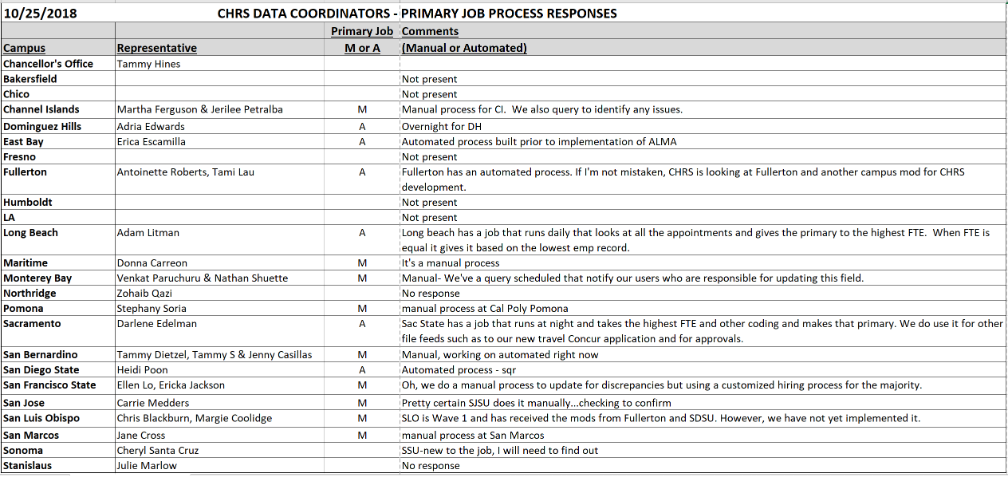
APPENDIX C: Tracking Primary Job – Campus Survey
During the Campus Data Coordinator check-in call on 10/25/18, meeting attendees were polled regarding how their campuses handle identification of Primary Job. Responses are below (blanks indicate no response or campus representative was not present on the call.)
End of Article