
Background
The SUSPENSE Combination Code is a default value that needs to be created using the PeopleSoft-delivered Combination Code page. The SUSPENSE Combination Code value maps to a SUSPENSE GL Account value that is unique to each campus. The SUSPENSE Combination Code is a required value when campuses are entering data on the PeopleSoft-delivered Department Budget Table.
The Suspense Code is a mandatory placeholder required by delivered PeopleSoft Commitment Accounting, but it has no functional role in CSU’s custom Labor Cost Distribution process. The Suspense Code exists only to satisfy a required field on the Department Budget Table (DBT).It is never used for payroll distribution, error processing, or GL posting.
For campuses to be successful in CHRS they must have a unique GL Account Code for the Suspense value. Per the Position Paper an older Effective Date, such as ‘01/01/1901’ must be used for the GL Account Code itself.
Campuses must have the value on the Department Budget Table (DBT) but are not required to have it on any trees.
Issue
In current HR Production, campuses define their SUSPENSE Combination Code value as ‘SUSPENSE’ (or some form of the word ‘SUSPENSE’). However, the GL Account value that each campus maps their SUSPENSE Combination Code to differs from campus to campus. Therefore, having multiple campuses using the same SUSPENSE Combination Code value of ‘SUSPENSE’, but mapping to different GL Account values will not work in CHRS.
Analysis
Changing the format of the SUSPENSE Combination Code values to include a campus identifying value will be required in CHRS to ensure there are no LCD processing issues for campuses that use similar SUSPENSE Combination Code values. This change will have no effect on how LCD processing or LCD reporting function in current HR Production. This change only impacts LCD processing in CHRS to ensure the correct mapping of Department Budget Table values. Campuses will not have to go back to change old transaction data in current HR Production. Campuses will need to switch to the new format when populating the SUSPENSE Combination Code value on or before the recommended implementation date. This will ensure that campuses going forward are prepared for their CHRS implementation.
It is also important that campuses map their SUSPENSE Combination Code to a unique GL Account value (one that is not already being mapped to by another campus).
Recommendations
Explanation:
Because campuses generally have their SUSPENSE Combination Code value populated for the entire year (either in December prior to the beginning of the calendar year or in June prior to the beginning of the fiscal year), they should follow this Position Paper format at a point in time in their 9.0 instance prior to December 2023. This will ensure the data will get migrated into CHRS via Conversion is done properly and prevent future Waves from experiencing certain issues during their LCD testing.
Campuses do NOT need to go back and change the SUSPENSE Combination Code values for previous LCD transaction data for months they have already completed processing.
All campuses will need to switch to the recommended format of ‘SUSPENSE_CCC’ when entering all future SUSPENSE Combination Code values. The format is defined as the word ‘SUSPENSE_’, followed by a three-character campus identifier (CCC). An example of the new format for Stanislaus would be ‘SUSPENSE_STA’. Click here to view the updated list of Suspense Codes.
To ensure campuses map their SUSPENSE Combination Code to a unique GL Account value, please reference this article to view the latest Suspense Codes to ensure your campus is not using a GL Account value that is already being used by a campus that will be live on CHRS prior to your campus.
This process requires campuses to delete existing SUSPENSE Combination Code values, and then create the new SUSPENSE Combination Code value. The following steps should be followed by campuses:
- Run the SQL Delete commands below to delete existing ‘SUSPENSE’ Combo Code values.
-- SQL Delete script to clear out old Suspense Combo Codes
Delete from PS_VALID_COMBO_TBL
Where FDM_COMBO_CD like 'SUSP%';
Commit;
Delete from PS_ACCT_CD_TBL
Where ACCT_CD like 'SUSP%';
Commit;
- Create the new SUSPENSE Combination Code value using the recommended format.
- Navigate to the Combination Code Table. Navigation: Set Up HCM > Product Related > Commitment Accounting > Budget Information > Combination Code Table
- Add a new value.
- Make sure to use an older Effective Date, such as ‘01/01/1901’.
- Make sure Account value is unique (not used by any other campus)
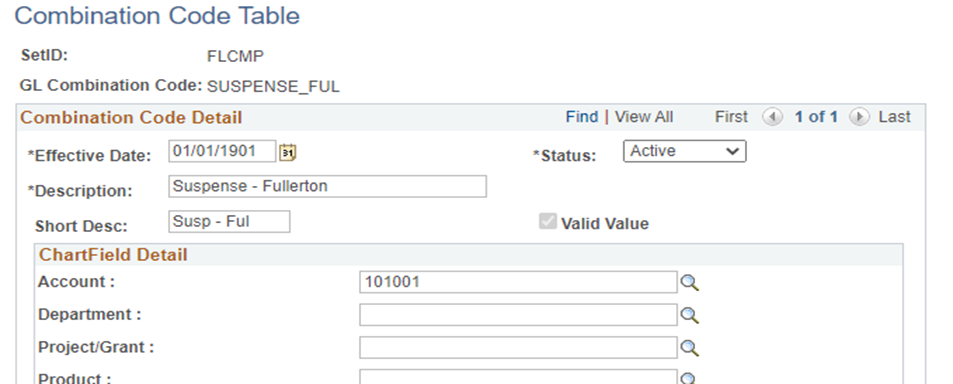
Save
- Run the CSU Combo Code Sync process.
Navigate to the CSU Combo Code Sync
Navigation: Set Up HRMS > CSU Product Related Setup > CSU LCD Setup > CSU Combo Code Sync
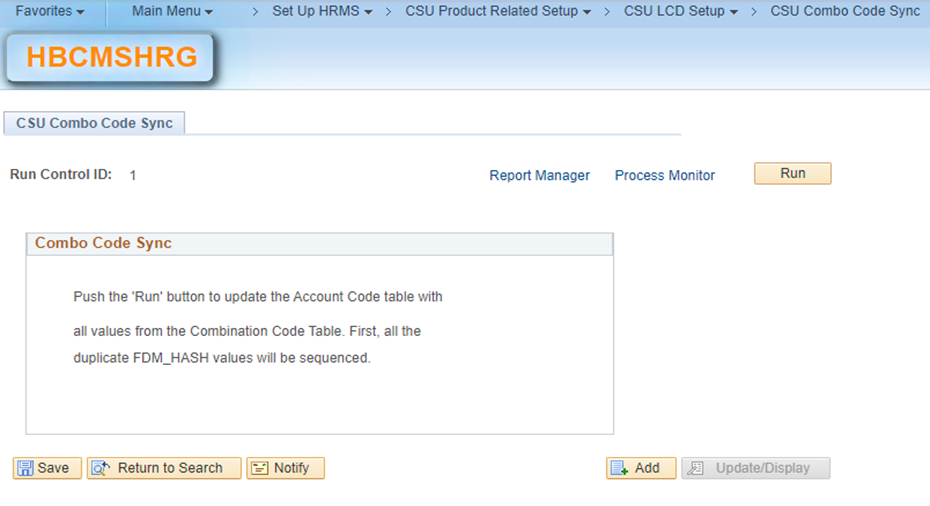
- Run the Update SQL commands below to update existing SUSPENSE Combo Code values in the DEPTBDGT_SUSPNS record (which links the SUSPENSE Combo Code to the Department Budget Table).
-- SQL Update script to change Suspense Combo Code value on the DBT record
Update PS_DEPTBDGT_SUSPNS
Set HP_ACCT_CD_SUSPNS = 'SUSPENSE_FUL';
Commit;
Considerations
Please open a ServiceNow ticket (use Category/Sub-Category = ‘CMS-HR/LCD’) immediately if you run into any issues with the steps to delete, create or update the SUSPENSE Combination Code.
Cross-Functional Impacts (Positive / Negative)
None.
CHANGE IMPACT
To be filled out by BSA (from Change Impact Tracking log):
Module | Map ID | Change Impact Log ID | Map Name | Impact Type | % of Employees Impact |
LCD | 95 | Labor Cost Distribution Monthly Processing | 9.0 | Data format | N/A |
The following items will be answered / addressed by Change Management:
Areas of potential change resistance to proposed HR process / policy changes?
N/A
Potential resource needs in order to plan, engage, prepare, and/or deploy the change?
N/A
Associated costs relative to the scope of the change to requirements requested?
N/A
Training needs or if a straightforward change?
This is a straightforward change.
Implication on any other related process / functions?
N/A
Union impact? Any additional comments (from Labor rep)?
None.
End of Article