
Background
Combo Codes are predefined chartfield combinations that LCD uses to distribute payroll expenses (earnings, deductions, and taxes) to the correct funding sources. Invalid or inactive Combo Codes can cause distribution/validation errors and prevent a clean journal from publishing to CFS. For campuses using Task Profiles, Time & Labor task selections help determine the Combo Code for certain time entries; that funding flows into LCD via CSU TL Earnings Distribution (CSU_TL_ERN_DIST) and can be updated using CSU Combo Code Override before downstream distribution.
Keeping Combo Codes current—including their effective dates—helps ensure LCD distributes payroll correctly and that the resulting accounting lines publish successfully to CFS. An equally important part of that maintenance is running the Combo Code Sync process to keep Combo Code data aligned and up to date.
The Combo Code Sync process ensures that the Combo Code/chartfield data used in CHRS remains aligned with the chartfield values maintained in CFS, allowing LCD to work with current and valid accounting information.
Currently, campuses use two records to store Combination Code (Combo Code) data:
• VALID_COMBO_TBL
• ACCT_CD_TBL
These records contain setup data rather than transactional data and are maintained by the campuses. Because they are referenced throughout the system, it is important that they remain synchronized. In particular, the following field must be consistent between both records: FDM_HASH.
Issue
There are several issues with these records that have allowed them to become quite large. These issues include:
- Every time the Combo Code Build process is run, at least 30 rows are inserted into each record
- The Combo Code Build allows for duplicates to be created
- While campuses can insert into these records, there is no way online in the system to update or delete rows from either record
- Only one of the two records (VALID_COMBO_TBL) contains a campus-defining field
- Only one of the two records (VALID_COMBO_TBL) contains an EFFDT and an EFF_STATUS field
Analysis
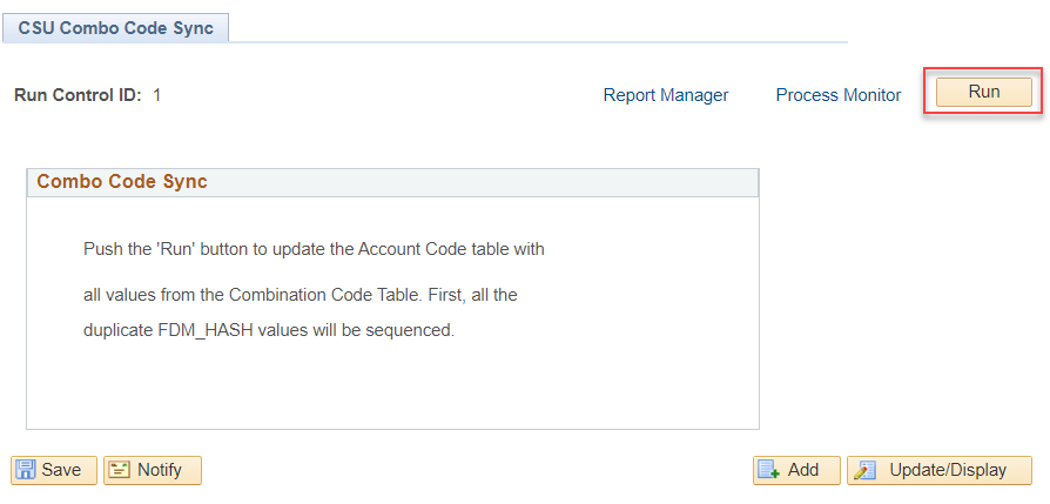
CHRS App Dev created a custom program (CSU Combo Code Sync process) to help campuses keep these two records in sync.
This custom program basically deletes ALL rows from the ACCT_CD_TBL, and then re-populates it with “Active” rows (EFF_STATUS = ‘A’) from the VALID_COMBO_TBL. However, not all campuses utilize the CSU Combo Code Sync process.
In addition, there is a new field being added to the ACCT_CD_TBL as part of the CHRS 9.2 Upgrade that will be populated with a campus Business Unit value during CHRS Conversion. This will give the ACCT_CD_TBL a campus-defining field in CHRS, and will include modifications to the Combo Code Sync and Combo Code Build processes to address this.
Recommendations
It is recommended to review all Combo Codes in HR 9.0 production prior to conversion. Begin by analyzing both active and inactive Combo Codes using a query or SQL against the VALID_COMBO_TBL.
During the review:
- Confirm that each Combo Code’s status is accurate.
- Verify the Combo Code structure and order are correct.
- Standard Combo Code Order is: Department – Fund – Account – Class – Program – Project
- Ensure all chartfield values (Account, Class, Fund, Project, Department) align with CFS in terms of effective date, status, and description.
- Identify any Combo Codes that are currently active but should be inactive. Each effective dated row will need to be inactivated if the Combo Code should be deleted fully.
Run SQL to remove all inactive rows from the VALID_COMBO_TBL where the effective status is set to inactive (EFF_STATUS = ‘I’):
Delete From SYSADM.PS_VALID_COMBO_TBL
Where EFF_STATUS = ‘I’;
Commit;
Run the custom CSU Combo Code Sync process:

Considerations
Most campuses run this process right before or after Fiscal Year End (July 1), while some campuses even run it monthly. CMS recommends that it be run monthly or whenever new Combo Codes are built. For CHRS, the recommendation is to run the steps outlined above immediately before conversion as well. This should improve processing for LCD, as well as the Time and Labor application whenever campuses search for TL Combo Code funding.
Future considerations and opportunities (post CHRS) include systemwide use of Position Control within PeopleSoft and use of a single system to support budgeting in a consolidated environment.
Cross-Functional Impacts (Positive / Negative)
- Benefits Administration - N/A
- Labor Cost Distribution/Budgeting – Positive
- Workforce Administration – N/A
- Time & Labor - Positive
- Absence Management – N/A
- Temp Faculty – N/A
- Recruiting (PageUp) – N/A
CHANGE IMPACT
To be filled out by BSA (from Change Impact Tracking log):
Module | Map ID | Map Name | Impact Type | % of Employees Impact |
| N/A |
BSA – Please answer the following:
Areas of potential change resistance to proposed HR process / policy changes?
N/A
Potential resource needs in order to plan, engage, prepare, and/or deploy the change?
The recommended steps will need to be executed by someone at campus with knowledge and appropriate access to the system.
Associated costs relative to the scope of the change to requirements requested?
No additional cost is expected.
Training needs or if a straightforward change?
This is a straightforward change.
Implication on any other related process / functions?
By performing both steps outlined in ‘Considerations’ annually should improve processing for the Time and Labor application whenever campuses search for TL Combo Code funding.
Union impact? (meet & confer recommended)
No reasonably foreseeable impacts within the scope of bargaining identified at the time of review.
End of Article