
Background
A Duplicate EMPLID is when the same employee has more than one EMPLID in PeopleSoft. Dup IDs are created inadvertently or in error and have been reviewed and identified by Human Resources (HR) and/or Campus Solutions (CS) as duplicates. There are a number of reasons why this may occur, which have been identified and outlined along with the processes in the Business Process Guide - Duplicate EMPLID Processing in Appendix A attached to the end of this document.
For the purpose of this document, Duplicate Employee EMPLIDs (“Dup IDs”) refer to occurrences within a single campus database instance and not employees working across multiple campuses. This document pertains to ALL employees (staff, faculty, and students) that have a Job record. If Dup IDs exist only on the CS side (no Job record exists) then no action is necessary. This also does not include POI’s which will be addressed at a future stage.
For CHRS, we want to convert only pertinent records. Since each campus manages Dup IDs in a variety of ways, it is important to establish a standardized method to identify unnecessary Dup IDs so they are not migrated into CHRS as part of the conversion process. Some campuses retain records that are necessary for specific reasons (e.g., attached to payroll). It is up to the discretion of each campus to determine if they want the Dup ID converted.
The objective is to recommend a standard method to identify which Dup IDs to exclude in the CHRS conversion process.
Issue
Campuses have different business processes for handling Dup IDs. In our efforts to migrate clean data into CHRS, campuses need to identify which Dup IDs should NOT carry forward into CHRS.
ID Delete: The ID Delete process removes Dup IDs from the entire database. Since the conversion process begins with Personal Data, only those EMPLIDs that exist in Personal Data will be placed into a mapping table and carried forward into CHRS. The conversion process then refers to this mapping table for all EMPLIDs in every table. No further action is required for those campuses that use ID Delete.
ID Change: For campuses that use ID Change, we need to establish a standardized method of identifying Dup IDs that will flag them during the first step of the conversion process.
Analysis
Several factors were considered as part of the analysis. The recommendations were reviewed and confirmed with the Conversion Team.
• An analysis was done by the five workgroup campuses on handling their Dup IDs.
• Counts were obtained from the workgroup campuses which range from 10-200. Based on these counts, manually updating each record to mark as DUP would be manageable. If upon further review, the counts get too high and manual updates would not be feasible, campuses will be provided with an SQL solution.
• No impact on other modules or functionality.
• Orphan records will not exist or be created as part of the clean-up process.
“DUP” Prefix needs to be added to HR and CS database to prevent Integration Broker (IB) errors.
•EMPLIDs with a prefix of ‘DUP’ will not get converted into CHRS.
Recommendations
This process assumes that Dup IDs have already been identified in your campus database and continued identification of any new Dup IDs is taking place.
- Review Dup IDs in the campus database:
- Determine if a Dup ID can be excluded from the conversion process
- If a Dup ID needs to be carried forward because it is attached to HR Payroll, then do NOT mark them as a DUP so that it will be included in CHRS.
- Mark the record that is to be excluded from conversion:
Add translate value “DUP” to the Name Prefix table to HR and CS databases (one time set up only). The Name Prefix table was one of the tables identified as a common HR/CS table that needs to be manually maintained by campuses after the Split. To avoid IB errors, it is necessary to add the “DUP” to the Name Prefix table on the CS side.
HR Database: Navigation: Main Menu->Setup HRMS->Foundation Tables->Personal->Name Prefix
CS Database: Navigation: Main Menu->Set Up Common Objects->Foundation Tables->Personal->Name Prefix

Retrieve the most current row in Personal Data with the Duplicate ID in Correction Mode and update the Name Prefix to “DUP”.
Navigation: Main Menu->Workforce Administration->Personal Information->Modify a Person
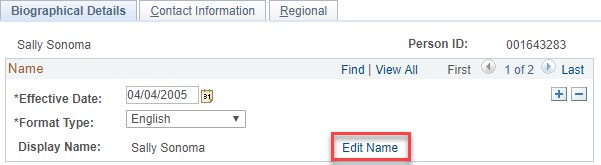
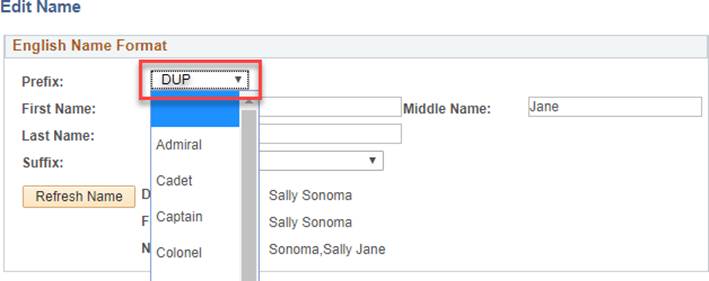
- The EMPLID that has a name Prefix = DUP will be excluded from the mapping table during conversion.
- Run a query and audit the results to ensure all changes were made. (An Audit Query has been provided in Appendix B).
Considerations
- Only employees with Job Data need to be reviewed. If the Dup ID is a student only (i.e., no Job Data) no action needs to be taken.
- Identifying the Dup ID in Name Prefix will ensure that there are no cross-functional negative impacts.
- When campuses go-live with CHRS Recruiting they should ensure that all duplicates are inactive records and continue to maintain the process.
Cross-Functional Impacts (Positive / Negative)
The first step of the Conversion process is to identify which EMPLIDs need to be converted using Personal Data. If an EMPLID is not to be converted, it will not be added to the mapping table which will then be used by all other modules in the conversion process.
Per the Conversion Team, this recommended process has:
- No Impact:
- Benefits Administration
- Labor Cost Distribution
- Workforce Administration
- Time & Labor
- Absence Management
- Temp Faculty
- Potential Impact:
- Recruiting (PageUp) - As long as the Dup ID record(s) are inactive, there will be no negative impact on CHRS Recruiting (PageUp) as only active records are loaded.
CHANGE IMPACT
To be filled out by BSA (from Change Impact Tracking log):
| Module | Map ID | Change Impact Log ID | Map Name | Impact Type | % of Employees Impact |
|---|---|---|---|---|---|
| N/A |
The following impact areas should be addressed by the Position Paper author(s) or a relevant stakeholder/approver. All items should have a response.
Areas of potential change resistance to proposed HR process / policy changes?
If campuses take no action, all data, including Dup IDs, will be converted.
Potential resource needs in order to plan, engage, prepare, and/or deploy the change?
HR Analyst, HR Manager (if approval needed), HRIS and/or IT person to make the configuration change.
Associated costs relative to the scope of the change to requirements requested?
No additional cost except for staff hours (for example: identifying and updating 200 records may take four hours of dedicated data entry which could be accomplished within a one-week timeframe.)
Training needs or if a straightforward change?
Each campus has a process for identifying and managing Dup IDs included in this recommendation.
Implication on any other related process / functions?
Nothing beyond what has already been discussed in this paper.
Union impact? Any additional comments (from Labor rep)?
No reasonably foreseeable impacts within the scope of bargaining identified at the time of review.
APPENDIX A: Duplicate EMPLID Processing BPG (10/21/13)
REVISION CONTROL
Revision History
| Date | By | Action | Section |
| 08/01/13 | Kee Chang | Initiated Document | All |
| 08/09/13 | Dana Handler | Made updates and added sections | All |
| 08/20/13 | Nicole Louie | Made updates and added sections | All |
| 09/05/13 | Kee Chang | Incorporated various changes | All |
| 10/21/13 | Kee Chang | Include info on Ext System table | pp. 10 |
Review/Approval History
| Date | By | Action | Section |
|
|
|
|
|
|
|
|
|
|
|
|
Confidentiality Statement
This document has been checked and screen shots do not contain any confidential information (staff names, addresses, and social security numbers).
Please add a new line; verifying that screen shots have been checked each time this document is published.
| Publishing Date | Name of Individual Checking Screen Shots |
|
|
Table of Contents
Business Process Workflow Diagram
3.1 ID Delete Control
3.2 Flagging Duplicate EMPLIDs – Current Practices
4.0 New Integration Requirement
5.0 Identifying and Resolving Duplicate Records
5.1 Two Types of Duplicate Records
5.2 Duplicate Decision Process
5.3 Two Duplicate Resolution Processes
6.0 Benefits of Using Delivered Processes
6.1 Running PeopleSoft Search Match
6.2 All IDs are Changed
6.3 Accountability
Introduction
Duplicate data is an unavoidable reality within Academic Enterprise Resource Planning (ERP) systems. In the PeopleSoft ERP, one unique EMPLID is assigned to each distinct person record and, with the various methods to create an EMPLID, managing duplicate data is inevitable.
In this document, duplicate EMPLIDs refer to one person who has more than one EMPLID in a single system. Duplicate EMPLIDs can be inadvertently generated for an individual for various reasons. Creating a person record in the Common Management System (CMS) does not require key identifying data elements such as Social Security Numbers (SSN) and dates of birth (DOB). This makes matching incoming person records difficult if the individual has a new address or a different name (nickname vs. formal name; married name vs. maiden name).
In addition, multiple departments on campus are required to create person records. While not desired, duplicate EMPLIDs are an issue.
With the new integration requirements between separate HR and Student PeopleSoft systems, the issue of duplicates will create additional challenges. To mitigate the complications of duplicate and suspended records in our new “Split” environment, a common duplicate data resolution process is not only a beneficial business practice but also an effective tool in keeping our person records clean and true throughout all CMS systems.
It is important to note: The scenarios and impacts in this document only refer to unique individuals in a single system who was erroneously assigned more than one EMPLID.
Employees who have worked at more than one campus and students who have attended different campuses will have multiple EMPLIDs, and are not considered duplicates. Employee person records that were previously contained within multiple campus Common Management System (CMS), will now exist in a consolidated Common Human Resource System (CHRS). The process of merging Employee EMPLIDs from multiple campuses will take place as part of the conversion into CHRS and are not addressed in this document.
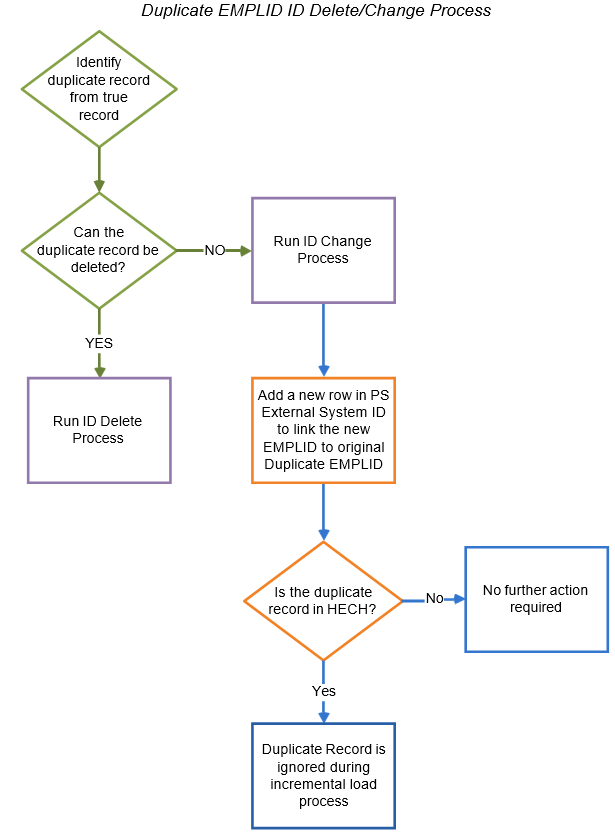
Business Process Workflow Diagram
The following flowchart provides an overview of the steps contained in this guide.
1.0 Document Purpose
The purpose of this document is to:
- Acknowledge the inevitable issue of duplicate EMPLIDs for an individual in a single CMS environment
- Outline the delivered process for identifying and managing the duplicate EMPLIDs that cannot be deleted
- Explain the delivered Person Synch process required to populate new HR hires in the respective Campus Solutions (CS) System
- Communicate impacts of this business practice on the new person synch integration requirement
- Recommend a common business practice to improve data integrity
2.0 Background
Multiple EMPLIDs can be generated for an individual for various reasons. For example, a POI record is created with minimal information; later a student application is received with more detailed information and it is difficult to determine if the existing POI record (with limited data) is a match, so a new EMPLID is created for the incoming applicant. In HR, duplicates can be created as a result of person records (POIs) created without critical core Person Data (date of birth and SSN). When searching by SSN to determine if a new hire has an existing EMPLID the existing POI would not appear as a match, thus resulting in a duplicate EMPLID created for the new hire.
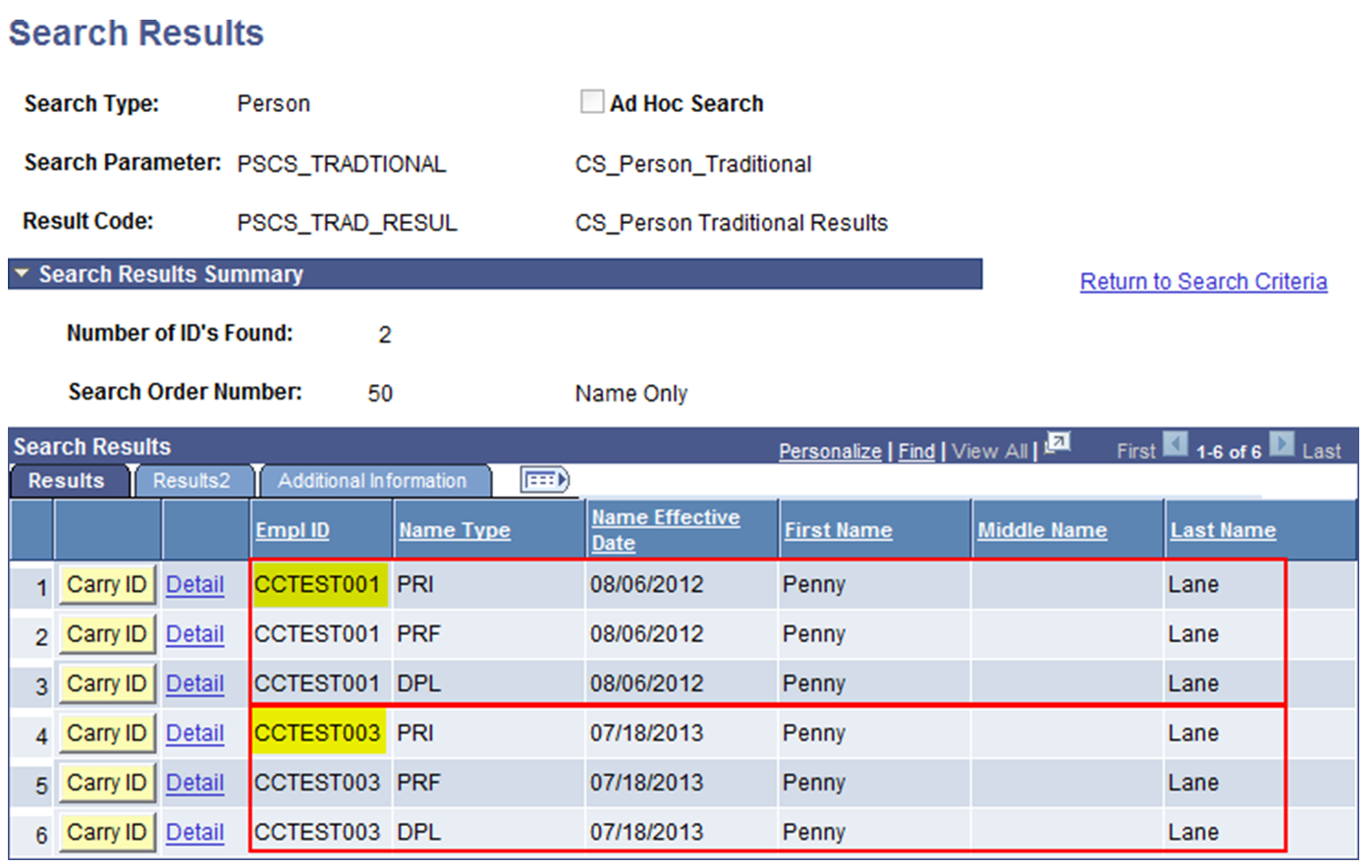
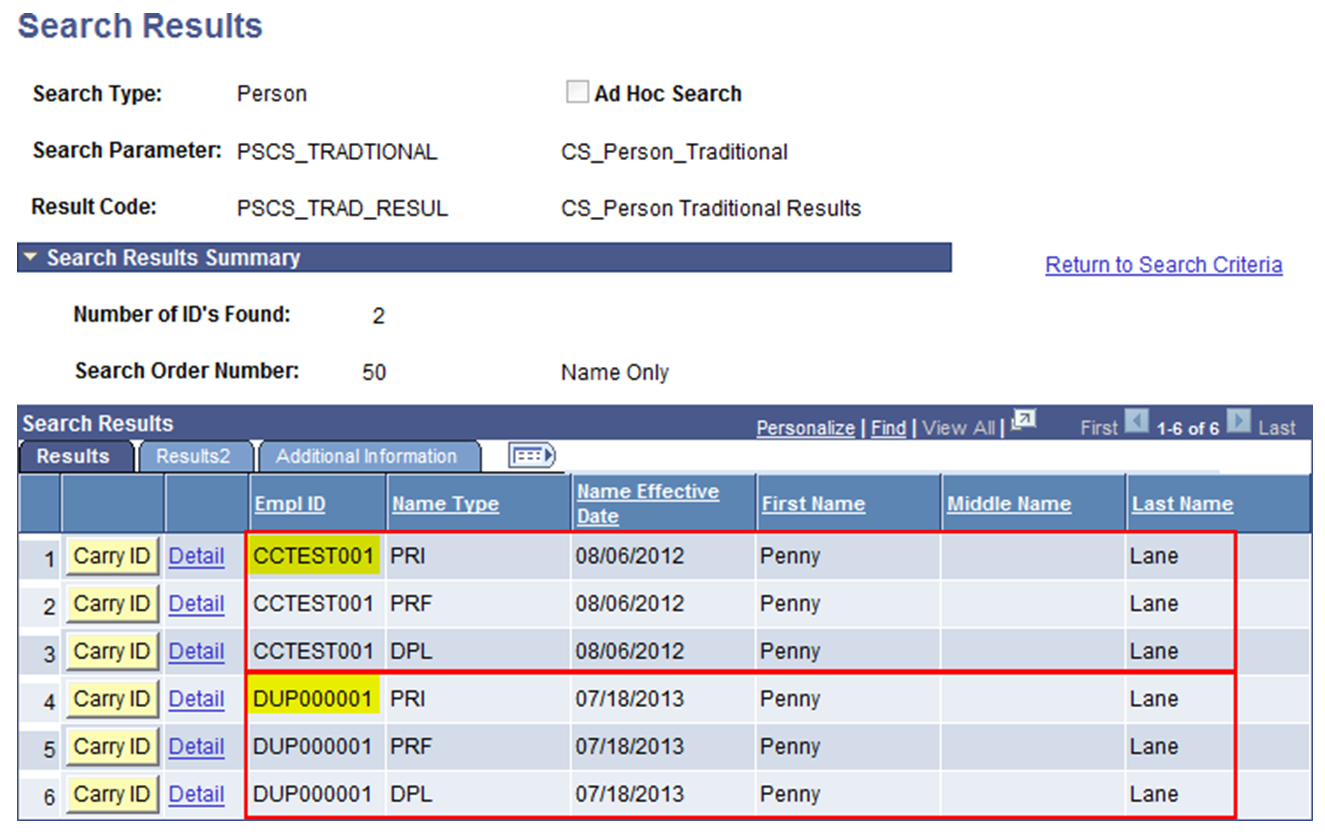
At some campuses, these duplicates are not often identified unless an end-user runs PeopleSoft (PS) Search/Match and discovers multiple EMPLIDs for a single person (as shown in the example below). When a potential duplicate is identified, it should be researched, identified and resolved.
3.0 Current Campus Practices
Current campus practices vary when handling duplicate data. Ideally, a discovered duplicate EMPLID should be deleted via the delivered ID Delete process. There are some circumstances which prevent the deletion of an EMPLID, which is discussed in section 3.1. Some campuses have a custom practice to identify and delete EMPLIDs after merging the data, which is discussed in section 3.2.
3.1 ID Delete Control
PeopleSoft delivers specific predefined “priority data” records that if populated by the duplicate EMPLID, prevent the deletion of the duplicate. The predefined priority data records for Campus Solutions are:
- ACCOUNT_SF
- RECRUITERS
- RELATIONSHIPS
- STDNT_CAREER
- STUDENT_AID
The predefined priority data records for Human Resources are:
- GP_PYE_PRC_STAT
- PAY_LINE
Additional records may be added by the campus and are found at the navigation: Campus Community > Personal Information > ID Management > ID Delete Control. The purpose of this control page is to prevent the deletion of important historical data of a student or employee, such as Financial Aid or Payroll information. The HECH-CS crosswalk table (a new component that will be delivered with the implementation of CHRS) needs to be added to this control record to prevent deletion of an EMPLID which exists in the HECH. An occurrence of an EMPLID in any of the listed records in ID Delete Control will prevent the ID Delete process from completing.
3.2 Flagging Duplicate EMPLIDs – Current Practices
If the EMPLID cannot be deleted, a variety of methods are used to change the person record name to flag it as a duplicate. Examples of this business practice include:
| FIRST_NAME | MIDDLE_NAME | LAST_NAME |
|---|---|---|
| Johnny | ZZZD 004640129 Cash | |
| Refer to: 102771121 | Penny Lane | Duplicate ID |
| Leah | Donner DO NOT USE THIS ID# |
4.0 New Integration Requirement
In addition to the consolidation of the 22 Human Resource systems into CHRS, the HR and (Student) Campus Solutions (CS) systems will split. The division of HR and Student data will require new integrations for CS to maintain business as usual. To support the Person data integration, new hires in CHRS will be automatically synched with the respective CS system. As part of this process, an automated Search Match will occur before a new EMPLID is created for the new hire in the respective CS environment to avoid creating duplicate records.
Once the person record is created additional data synch processes from CHRS will occur, such as Job data to support Faculty integrations in CS as well as any provisioning needed for the employee population, where the person record will be the foundation for all subsequent data synchs.
As part of the automated Search Match process, incoming person records from CHRS that match against multiple existing person records in the CS environment, will be suspended and require manual intervention.
As part of the Person synch, new hires processed in CHRS will trigger an automated process to create the person record in the respective CS system. This process will need to search the respective CS system to determine if the new hire has an existing EMPLID. If the CS system returns multiple matches (often a result of duplicate EMPLIDs) the incoming new hire Person record will suspend.
Impacts of Duplicate EMPLIDs in CS
Existing duplicate records in the campus environments will increase the occurrence of new hire records suspending and the amount of manual intervention to complete initial synchronizations from CHRS. Specific impacts include:
- Delay in creating or updating EMPLIDs for new hires in the respective CS system
- Delay in Campus network provisioning and access to campus services initiated out of CS
- Delay in subsequent data synchs from CHRS including the Workforce/Job data
- Delay in adding new faculty members to courses, class schedules & rosters
5.0 Identifying and Resolving Duplicate Records
5.1 Two Types of Duplicate Records
As mentioned previously, depending on the transactional details associated with the duplicate EMPLIDs, different processes will be required to address the duplicate. To decide which process to use, it is essential to understand how to determine if one of the duplicate EMPLIDs can be deleted.
- Simple Duplicate:
Simple Duplicates are scenarios in which one of the two duplicate EMPLIDs can be deleted. A typical Simple Duplicate scenario would include a quick admit or manual application where only minimal bio/demo data was entered. Meanwhile, a Mentor application with more detailed information is received, and a second EMPLID was created. One of the two EMPLIDs may be deleted because the EMPLID does not have any transactional record with your institution, such as HR Payroll, Financial Aid Disbursement, or Student Financials data, associated with it.
In conjunction with the delivered ID Delete process PeopleSoft also provides an ID Delete Control page (see section 7.1) to prohibit the EMPLID from being deleted when transactional data in identified tables exists.
- Complex Duplicate:
Complex Duplicates include scenarios in which both EMPLIDs have specific transactional data tied to it and neither EMPLID can be deleted. The ID Delete Control process will prevent the Complex Duplicate scenarios from being deleted. These Complex Duplicates often have Student Financials, Academic Career or other critical data associated with both EMPLIDs. Therefore, their data would exist in one or more records listed in ID Delete Control page. For a complete list, please refer to your institution’s ID Delete Control page (also see section 7.1).
5.2 Duplicate Decision Process
Many campuses may have their own identified processes in place to handle duplicate data situations. The following delivered processes can also be used to identify and remedy Simple and Complex duplicate EMPLID issues.
5.2.1 Confirm the EMPLIDs are Duplicates The delivered Search/Match assists in initially identifying potential duplicates based on core biographical criteria. In the example below, the results show two people with same name but different EMPLIDs.
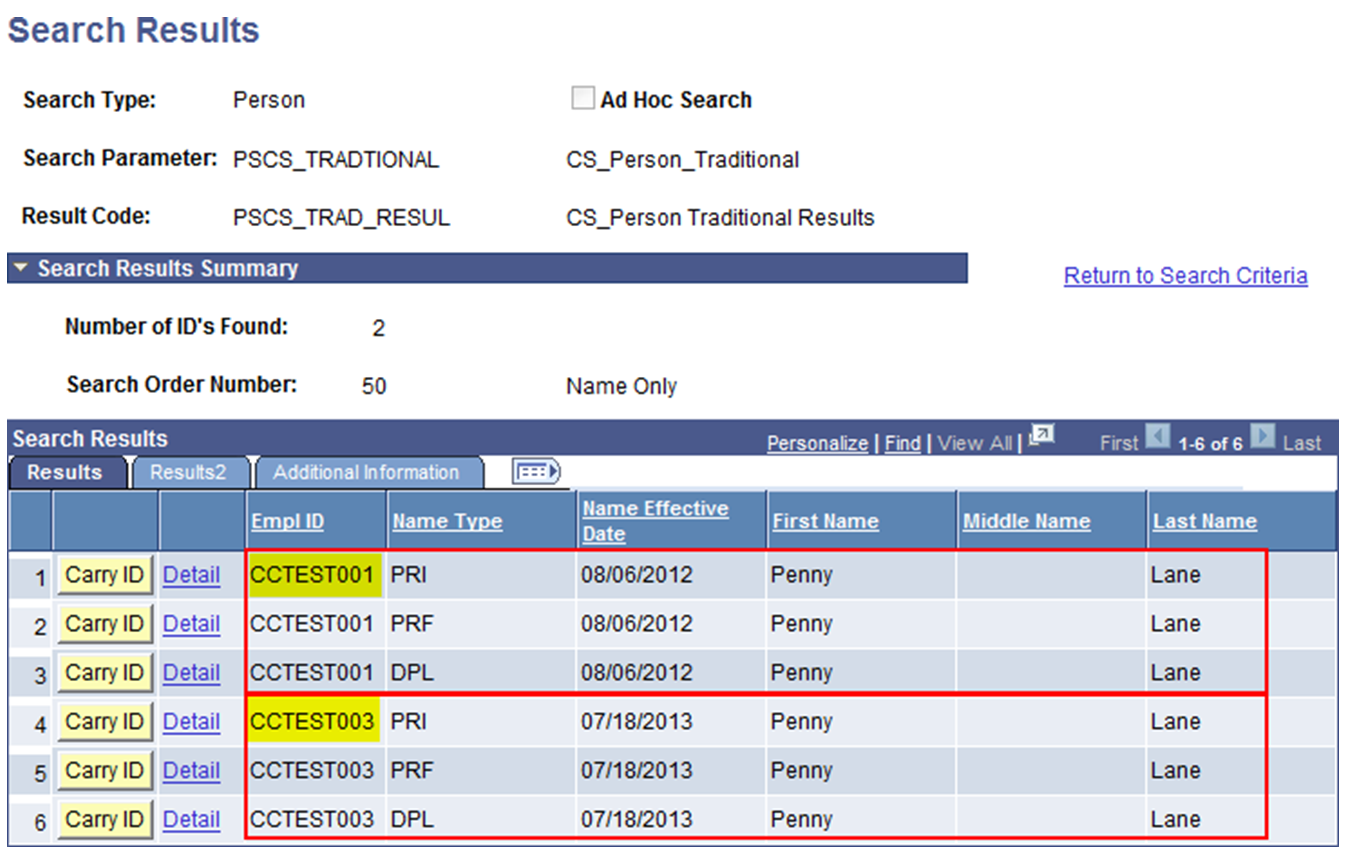
The Campus Data Steward (or appointed delegate) would review core Person data to determine if the reported duplicates are indeed duplicates. Once it is determined that a duplicate exists, the next step will be to determine if one of the two EMPLIDs/Person records can be deleted.
5.2.2 Identify the type of duplicate: Review the list of Records in ID Delete Control page (Home> Campus Community> Personal Information> ID Management> ID Delete Control1) and see if the false EMPLID exists in any of the records listed by running queries (see screenshot below).
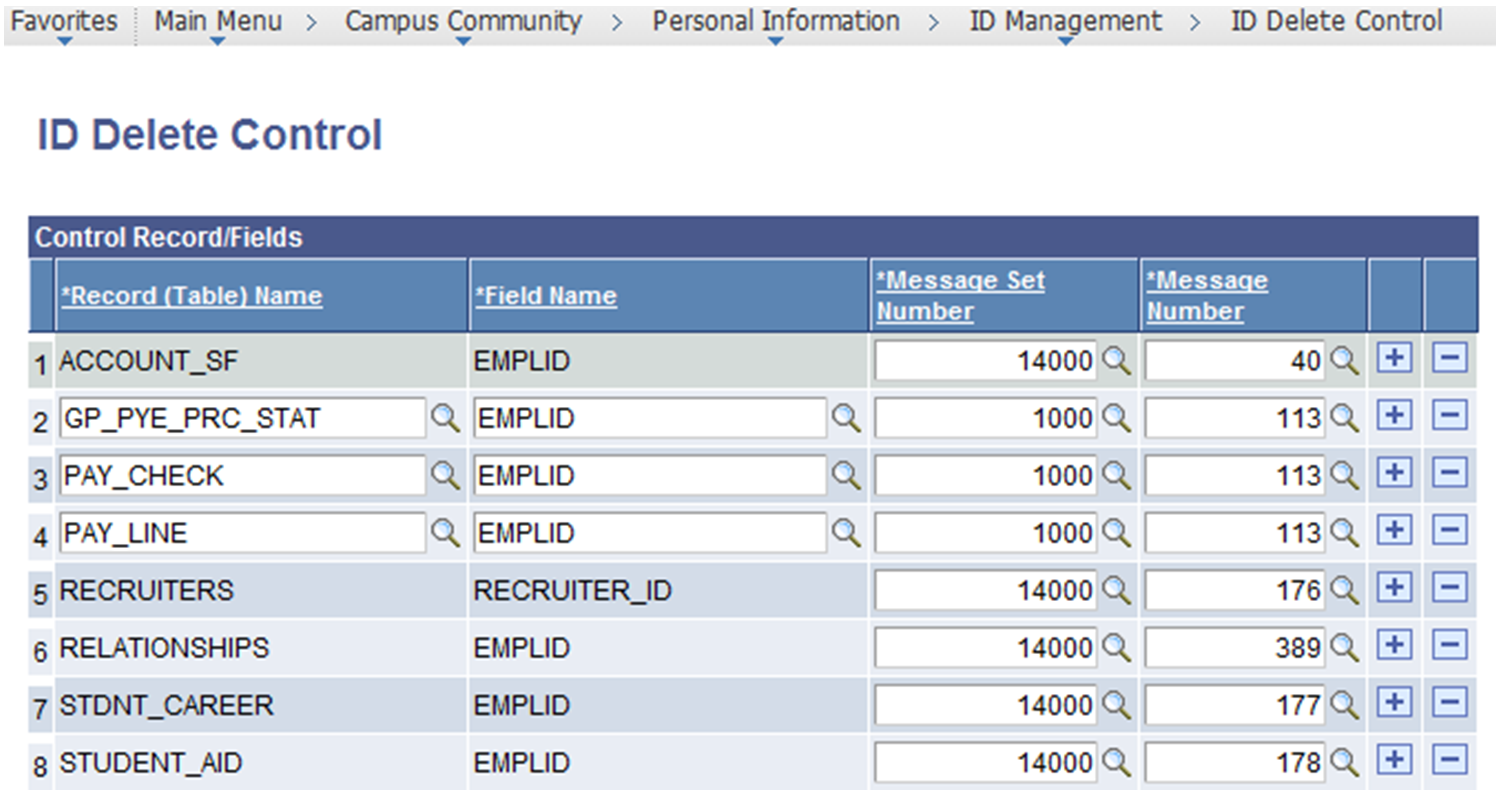
If one of the EMPLIDs does not have data in any of the records on the ID Delete Control then it is a Simple Duplicate. If both EMPLIDs have transactional data stored in any of the records, then it is a Complex Duplicate and neither EMPLID can be deleted.
5.3 Two Duplicate Resolution Processes
The process used to address the duplicate record is dependent on the transactional details tied to the two EMPLIDs for one person. Once the duplicate scenario is identified as Simple or Complex one of the following two procedures can be followed.
5.3.1 ID Delete Process for Simple Duplicate Scenarios
- Navigate to the ID Delete Process Run Control
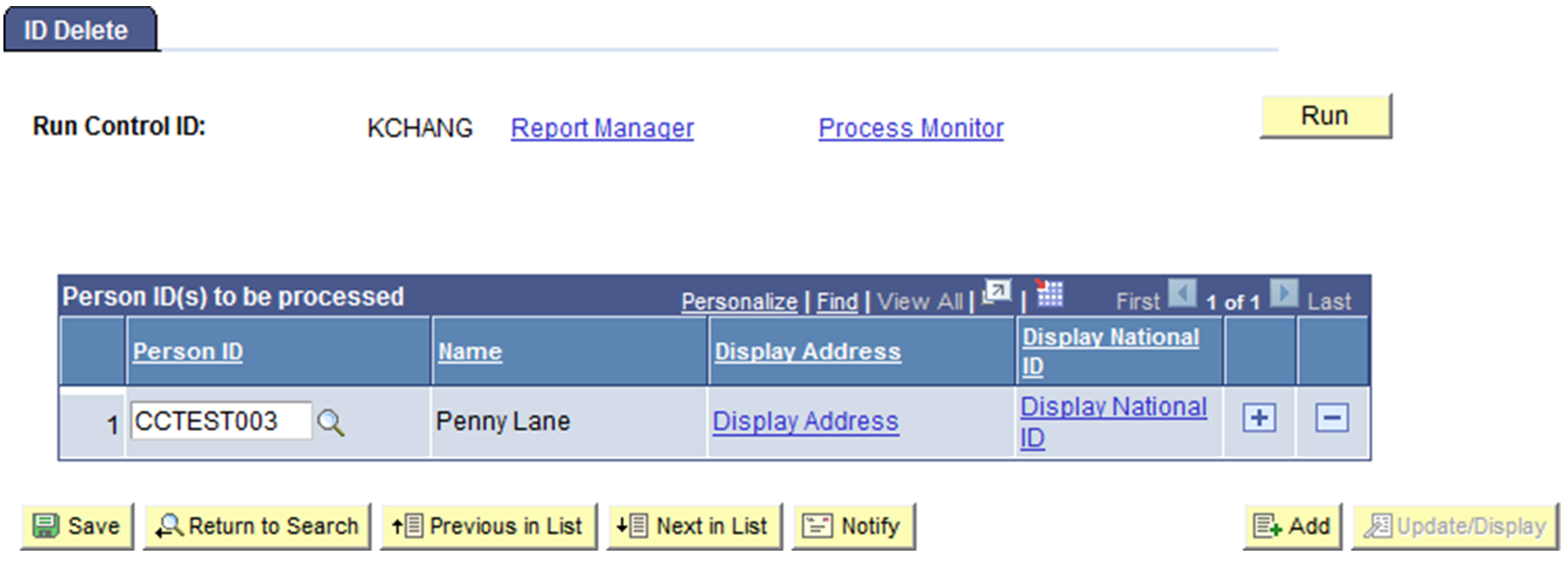
- Enter the EMPLID that does NOT have transactional detail stored in the records identified in ID Delete Control (and is not in HECH): Run ID Delete Process by entering the EMPLID identified for deletion and click Run.
5.3.2 ID Change Process for Complex Duplicate Scenarios
If neither of the EMPLIDs can be deleted, the EMPLID with the most significant transactional information should be maintained. It is a manual process to move the relevant transactional data to the EMPLID that will be maintained going forward. Once the selected EMPLID is updated the duplicate ID should be changed.
The PeopleSoft delivered EMPLID Change Process will change the duplicate EMPLID in all associated tables. CMS recommends a standard approach so that these duplicated records are easily recognized as the bad EMPLID that is no longer being maintained and so there will be a standard flag to prevent these bad EMPLIDs from loading into the HECH and/or Data Warehouse.
- Navigate to External System ID page
- Select External System value from drop-down. It is recommended campus designate an appropriate translates value for this drop-down, which can be created in External System page (Home> Set Up SACR> Product Related> Campus Community> Define Campus Community> Setup Define External Systems).
- Enter the EMPLID that will no longer be maintained in External System ID field.
- Click Save.
- Run the ID Change process to a prescribed nomenclature. For example, alpha characters of DUP followed by 6 numeric characters done incrementally as shown below.
- Save and Click Run.
6.0 Benefits of Using Delivered Processes
6.1 Running PeopleSoft Search Match
Person records can still be searched by their names when ID Change is used. Both EMPLIDs will display but the debunked EMPLIDs are easy to distinguish.
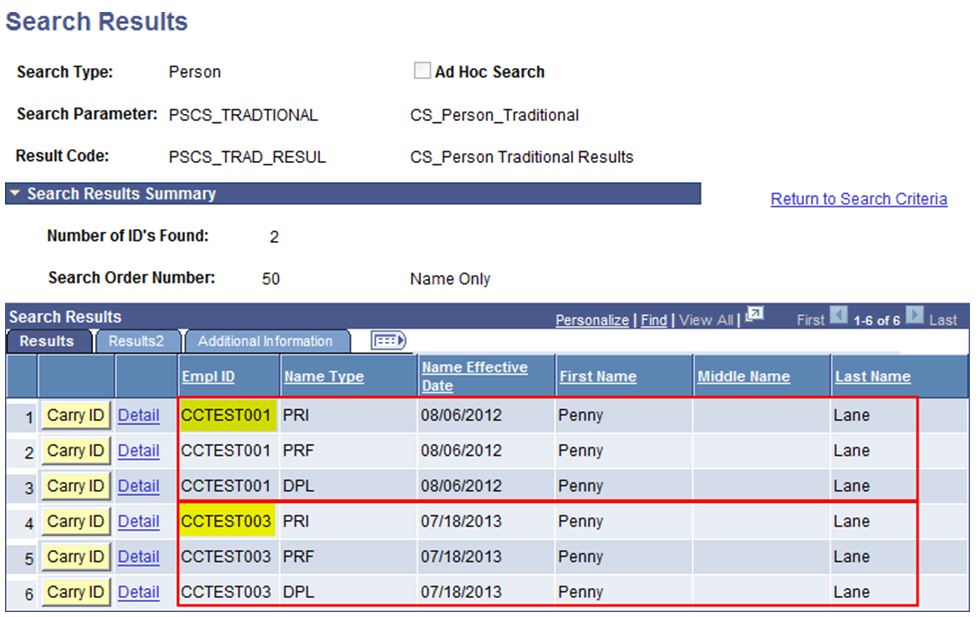
6.2 All IDs are Changed
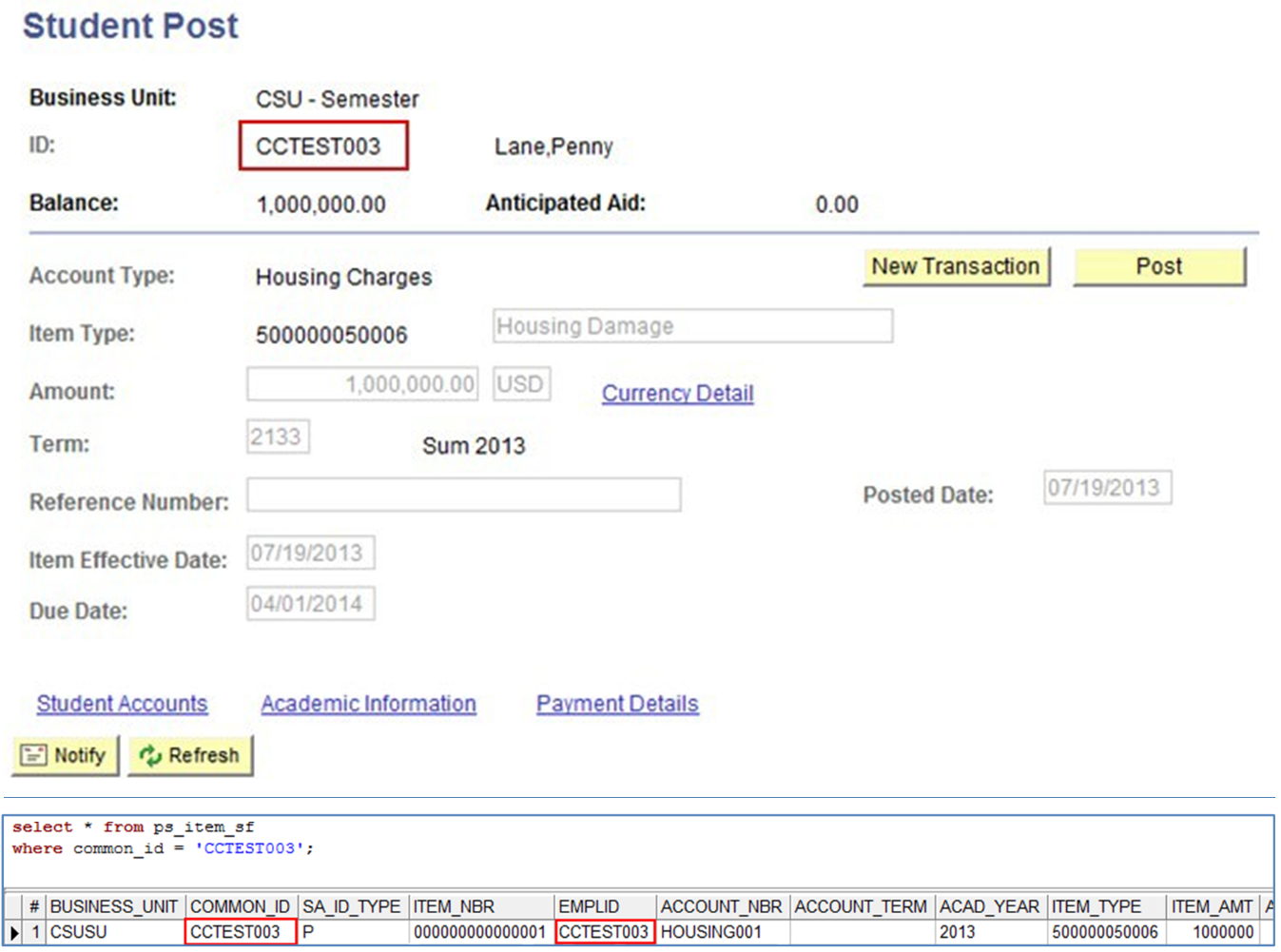
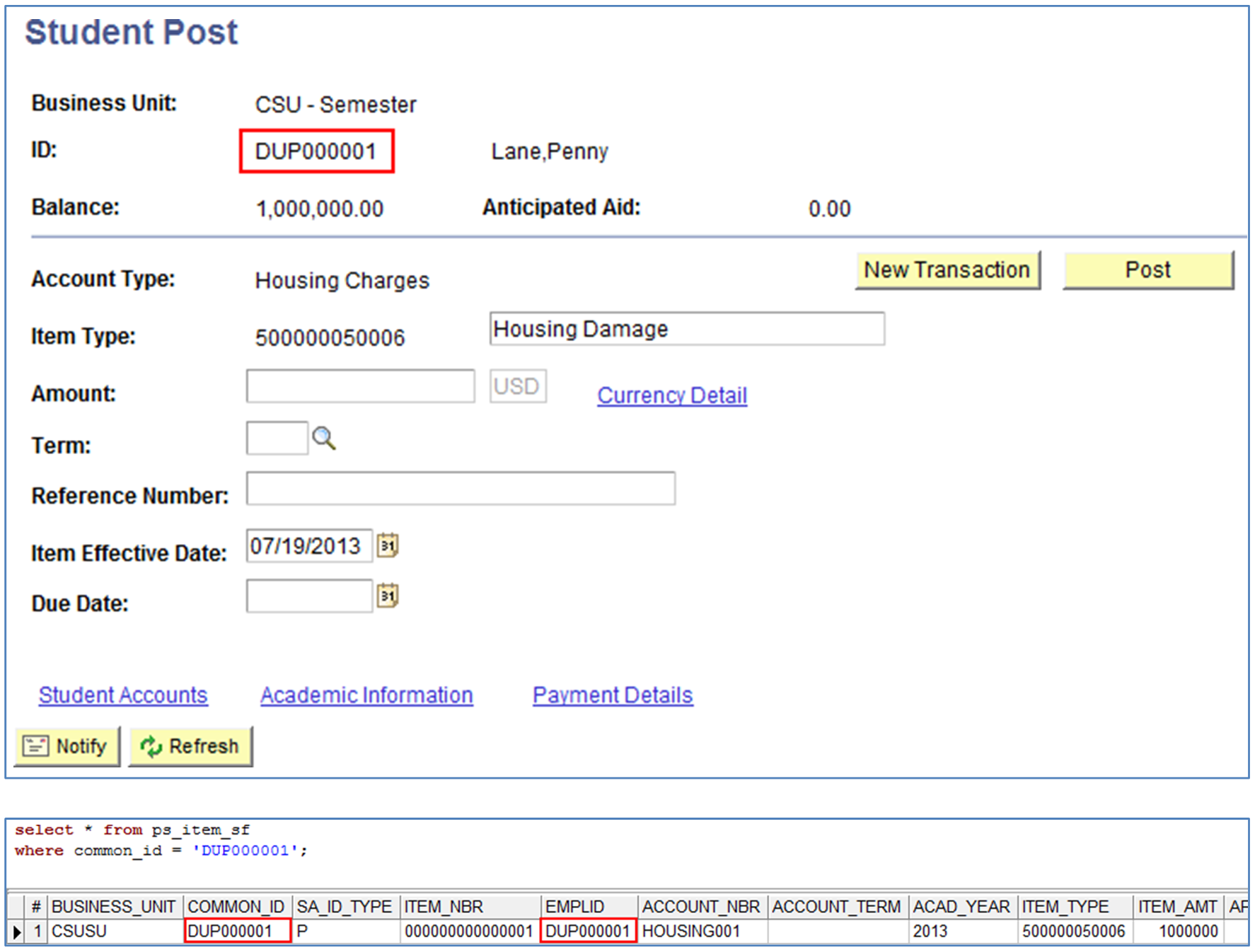
The ID Change process changes all IDs, such as EMPLID and COMMON_ID.
For example, if the student has Student Financials data, the ID Change process will change the EMPLID that will no longer be maintained with the new DUP prefix. Before and after screenshots are illustrated below:
6.3 Accountability
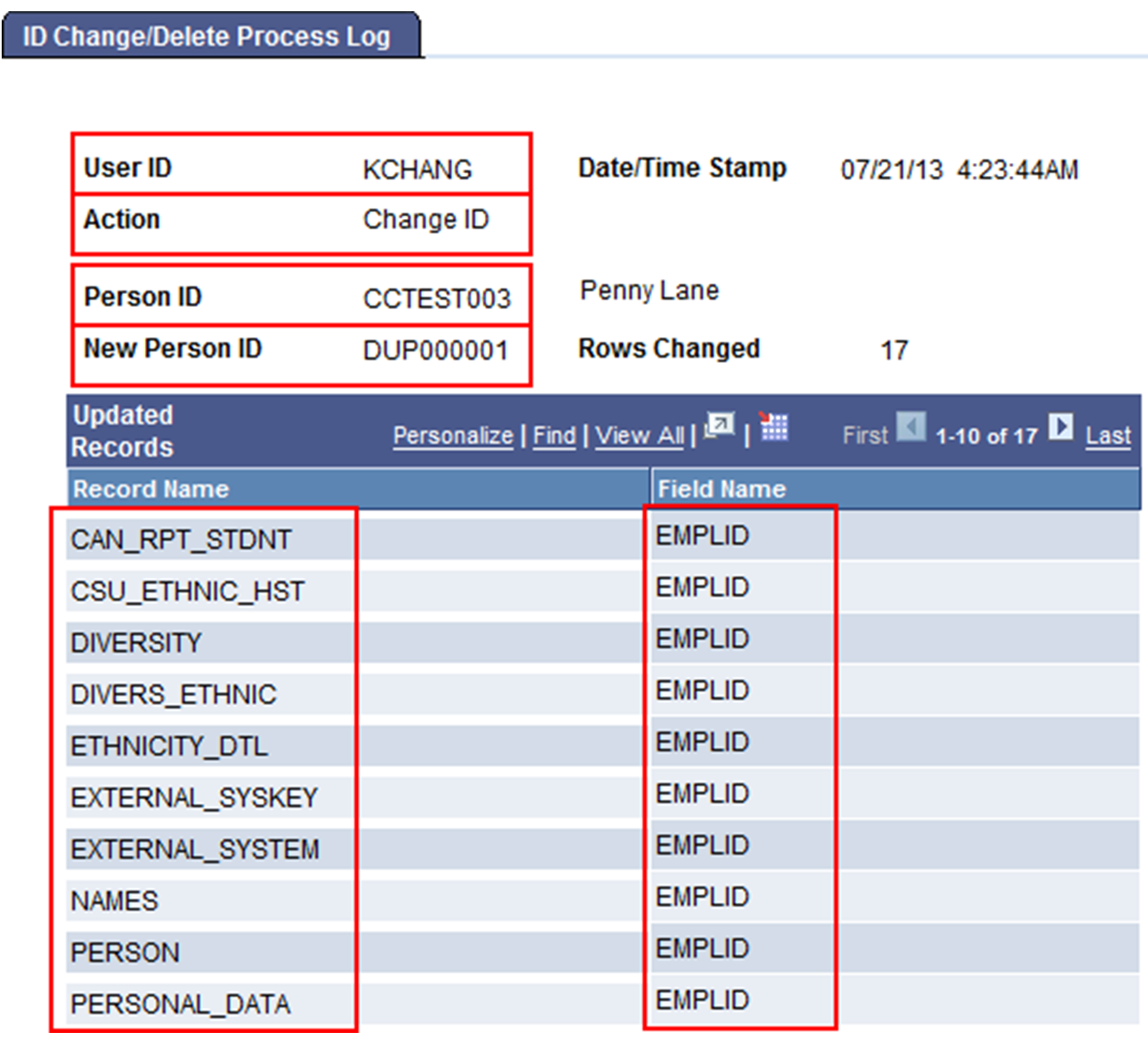
The ID Change/Delete Process Log provides an audit trail for Campus Data Stewards to review (see screenshot below). The log displays who ran the process, what action was taken, new and old ID, etc. In extreme cases, the ID Change process can be run to return DUP ID back to an EMPLID if needed using the information from the log.
APPENDIX B: AUDIT QUERY (SQL and query results for Name Prefix = DUP)
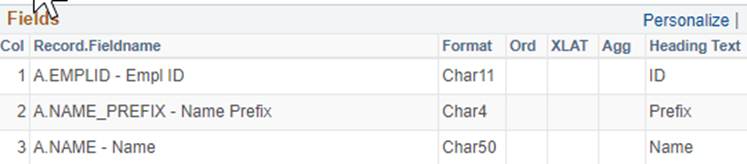
TABLE: PERSON_NAME
FIELDS:
CRITERIA:

SQL:
SELECT DISTINCT A.EMPLID, A.NAME_PREFIX, A.LAST_NAME
FROM PS_PERSON_NAME A
WHERE ( A.NAME_PREFIX = 'DUP')
End of Article