This document provides users with answers to frequently asked questions about integration functionality related to the integration security for CHRS 9.2 and Campus Solutions (CS) 9.2.
What roles are the campus responsible to create in CS when implementing CHRS?
Campuses are required to create roles and permission lists in CS for the CHRS Cross Reference, CHRS Cross XRef Table, and HR Table Refresh.
Will a delivered role be provided by CMS to campuses to access the CHRS Crosswalk Table (CSU_CHRS_XREF) in CS? (Navigation: Menu > CSU SA Baseline > CSU Campus Community > CHRS Cross Reference)
No, Campuses will need to develop their own role or add the CSU_CHRS_XREF page to an existing role.
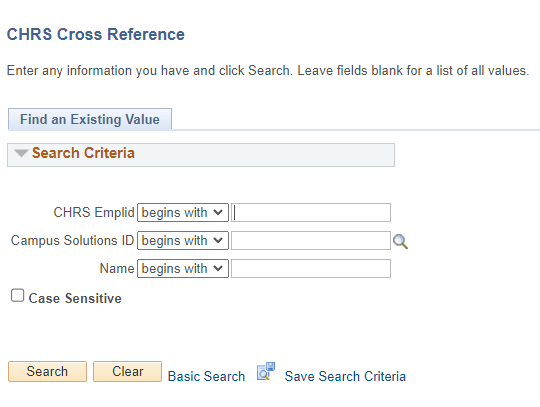
For the CHRS Crosswalk Table in CS what is the Menu Name and Component? (Navigation: Menu > CSU SA Baseline > CSU Campus Community > CHRS Cross Reference)
Menu: CSU_CHRS_INTEGRATION
Component: CSU_CHRS_XREF
Will a delivered role be provided by CMS to campuses to access the CHRS Cross XRef Table Refresh in CS? (Navigation: Menu > CSU SA Baseline > CSU Campus Community > CHRS XRef Refresh > Process > CHRS Cross XRef Table Refresh)
No, Campuses will need to develop their own role or add to an existing role.
For the CHRS Cross XRef Table Refresh in CS what is the Menu Name and Component? (Navigation: Menu > CSU SA Baseline > CSU Campus Community > CHRS XRef Refresh > Process > CHRS Cross XRef Table Refresh)
Menu: CSU_CHRS_INTEGRATION
Component: CSU_RUN_XRF_RFS
Page: CSU_RUN_XRF_RFS
How do I give access to CHRS Cross Reference and CHRS Cross XRef Table in CS?
Campuses are required to create roles and permission lists in CS for the CHRS Cross Reference and CHRS Cross XRef Table. This is the permission list information needed:
Menu: CSU_CHRS_INTEGRATION
all components
all pages
all actions
How do I get access to CHRS Cross Reference and CHRS Cross XRef Table in CS?
Campuses are required to create roles and permission lists in CS for the CHRS Cross Reference and CHRS Cross XRef Table. This is the permission list information needed:
Menu: CSU_CHRS_INTEGRATION
all components
all pages
all actions
How do I get access to HR Table Refresh in CS?
Campuses are required to create roles and permission lists in CS for the HR Table Refresh. This is the permission list information needed:
Menu: CSU_CHRS_INTEGRATION and CSU_INTEGRATIONS
all components
all pages
all actions
For the HR Table Refresh in CS what is the Menu Name and Component? (Navigation: Menu > CSU SA Baseline > CSU Integrations > CSU Refresh HR Data)
Menu: CSU_CHRS_INTEGRATION and CSU_INTEGRATIONS
Component: CSU_RUN_XRF_RFS and CSU_WORKLOAD_RUN
To view the Asynchronous and Synchronous messages in CS, what role do I need?
Users will need a total of 2 roles:
- CMS_PT_CSUCSHR
- CMS_PT_ENABLE_CI
When is CMS_PT_CSUCSHR and CMS_PT_ENABLE_CI available to add to a campus user in CS?
The roles are delivered in CS008 and can be granted to a campus once CS008 is applied to the campuses CS production during the CHRS MTP.
To view the Asynchronous and Synchronous messages in CHRS, what role do I need?
Campus DO NOT have a role in CHRS to view Asynchronous and Synchronous messages. Due to the Level 1 data imbedded in the Asynchronous and Synchronous messages in CHRS, only those in CMS will have access.
Can a Change Control be submitted to have a role created for campuses to view Asynchronous and Synchronous messages in CHRS?
Campus are always welcome to submit Change Controls. However, due to the Level 1 data imbedded in the Asynchronous and Synchronous messages in CHRS, a Change Control will not be approved.
End of Article